



Kompakte Wetterstation: Arduino Nano & ESP8266 mit BMP280 Barometrischem Sensor & OLED/Nokia LCD Display
Komponenten und Zubehör
 |
|
× | 1 | |||
 |
|
× | 1 | |||
|
× | 1 | ||||
|
× | 1 | ||||
 |
|
× | 1 |
Notwendige Werkzeuge und Maschinen
 |
|
Über dieses Projekt
Dieses Gerät besteht aus zwei unabhängigen Baugruppen in einem Gehäuse.
Die eine ist der Arduino-Barometer mit dem BMP180-Sensor, der einen Bericht über den aktuellen, -1h und -3h Unterschied im Luftdruck enthält. Diese Berichte sind besonders nützlich für die kurzfristige lokale Wettervorhersage. Der Code stammt von der Website „shelvin.de“, in die der Unterschied zwischen absolutem und relativem Luftdruck für die gegebene Höhe in der Zeile „druck_offset=“ im Code eingegeben wird. Die Ergebnisse werden auf dem N5110 LCD-Bildschirm angezeigt, der auch die Innentemperatur anzeigt.

Das nächste Gerät wird von einem ESP8266-Board betrieben, das ein 0,96-Zoll-OLED-Display anschließt. Der ESP8266 verbindet sich über WLAN mit der „openweathermap“-Seite, von der er eine 3-Tage-Wettervorhersage abruft und auf dem OLED-Display anzeigt. Dafür müssen Sie einen API-Key in den Code eintragen, den Sie von der Openweathermap-Seite erhalten. Vollständige detaillierte Anweisungen zur Installation von Bibliotheken und Code auf dem ESP8266 finden Sie unter:
https://blog.squix.org/wp-content/uploads/2017/06/esp8266weatherstationgettingstartedguide-20170608.pdf
In diesem speziellen Fall verwende ich das NodeMCU 1.0 (ESP12E Modul) Board.
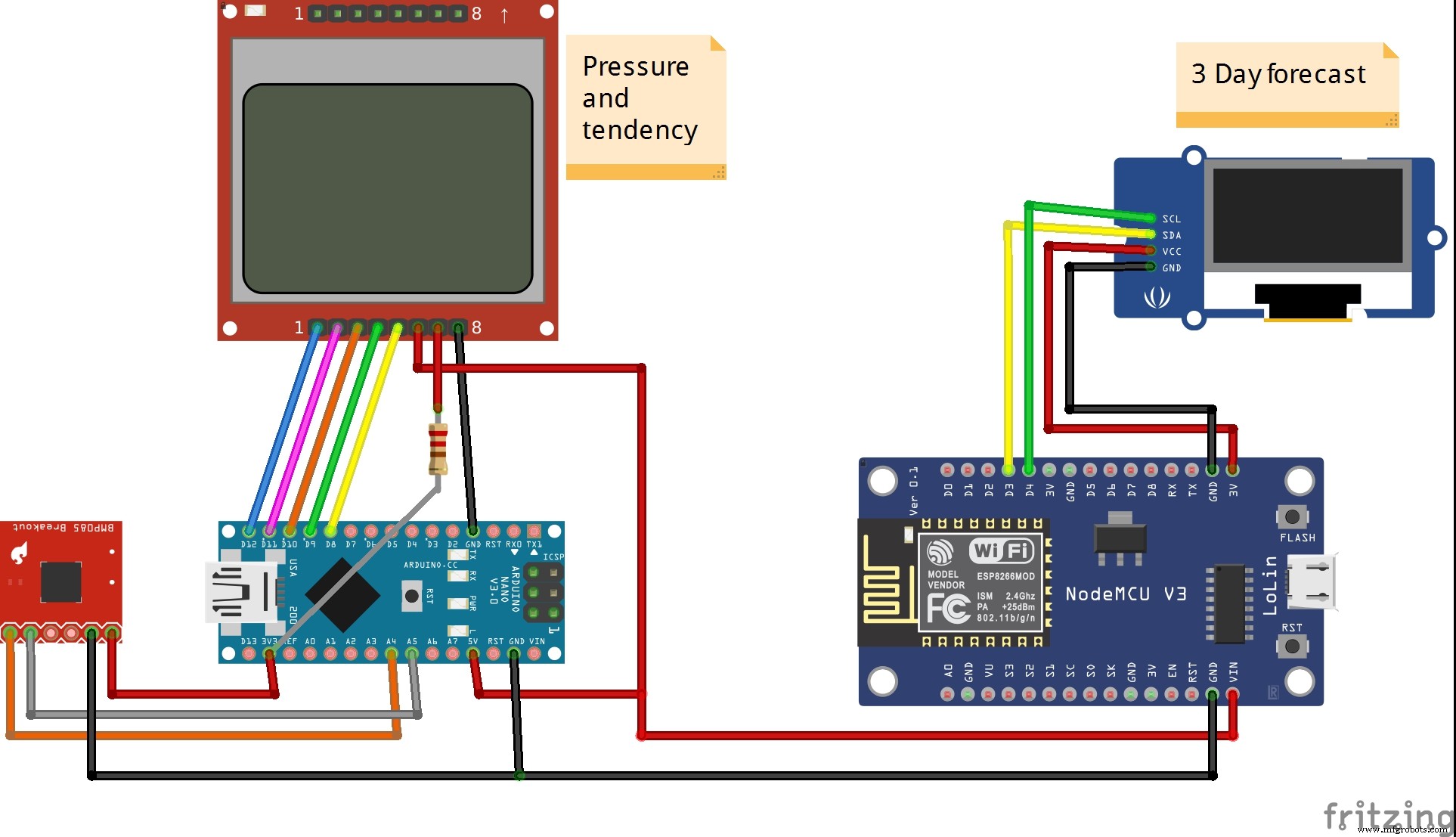
Das Bild unten zeigt das Schema des kompletten Geräts.
Code
- Unbenannte Datei
Unbenannte Datei Arduino
// Luftdruck Ausgabe aktuell // Luftdruckdifferenz wird mit 1 und 3 Stunden vorher (im EEPROM) verglichen und ausgegeben // Temperatur Ausgabe aktuell // // Bauteile: // LCD Display vom Nokia 5110 // BMP180 Luftdrucksensor // Arduino Uno // // Matthias Busse Version 1.0 vom 21.9.2014 #include#include #include // EEPROM Variablen int eepromAdresse=0, eepromMax=1023; // 1024 EEPROM Speicherplatze, 0-1023 int eepromOldAdr, eepromDif1=60, eepromDif3=180; // 60/180 Speicherplatze (Minuten) zurueck vergleichen // BMP180 Variablen #define I2C_ADDRESS 0x77 const unsigned char oversampling_setting = 3; //oversamplig: 0 ungenau (13ms) ... 3 genau (34ms) const unsigned char pressure_waittime[4] = { 5, 8, 14, 26 }; // lt. Datenblatt BMP-180 int ac1, ac2, ac3, b1, b2, mb, mc, md; unsigned int ac4, ac5, ac6; int temp = 20, temp_mittel=200, test=0; long druck = 1013, druck_mittel=101300; float t, temp_offset=0.0, d, dAlt, dDiff, druck_offset=2.0; int zeitabgl=0, mitteln=5; char tstring[5], dstring[7]; // Power Down Variablen volatile int sleepcounter = 0; // Schlafzyklen mitzaehlen // Display Variablen static const byte ASCII[][5] = {// ASCII Tabelle mit Fonts {0x00, 0x00, 0x00, 0x00, 0x00} // 20 ,{0x00, 0x00, 0x5f, 0x00, 0x00} // 21 ! ,{0x00, 0x07, 0x00, 0x07, 0x00} // 22 " ,{0x14, 0x7f, 0x14, 0x7f, 0x14} // 23 # ,{0x24, 0x2a, 0x7f, 0x2a, 0x12} // 24 $ ,{0x23, 0x13, 0x08, 0x64, 0x62} // 25 % ,{0x36, 0x49, 0x55, 0x22, 0x50} // 26 & ,{0x00, 0x05, 0x03, 0x00, 0x00} // 27 ' ,{0x00, 0x1c, 0x22, 0x41, 0x00} // 28 ( ,{0x00, 0x41, 0x22, 0x1c, 0x00} // 29 ) ,{0x14, 0x08, 0x3e, 0x08, 0x14} // 2a * ,{0x08, 0x08, 0x3e, 0x08, 0x08} // 2b + ,{0x00, 0x50, 0x30, 0x00, 0x00} // 2c , ,{0x08, 0x08, 0x08, 0x08, 0x08} // 2d - ,{0x00, 0x60, 0x60, 0x00, 0x00} // 2e . ,{0x20, 0x10, 0x08, 0x04, 0x02} // 2f / ,{0x3e, 0x51, 0x49, 0x45, 0x3e} // 30 0 ,{0x00, 0x42, 0x7f, 0x40, 0x00} // 31 1 ,{0x42, 0x61, 0x51, 0x49, 0x46} // 32 2 ,{0x21, 0x41, 0x45, 0x4b, 0x31} // 33 3 ,{0x18, 0x14, 0x12, 0x7f, 0x10} // 34 4 ,{0x27, 0x45, 0x45, 0x45, 0x39} // 35 5 ,{0x3c, 0x4a, 0x49, 0x49, 0x30} // 36 6 ,{0x01, 0x71, 0x09, 0x05, 0x03} // 37 7 ,{0x36, 0x49, 0x49, 0x49, 0x36} // 38 8 ,{0x06, 0x49, 0x49, 0x29, 0x1e} // 39 9 ,{0x00, 0x36, 0x36, 0x00, 0x00} // 3a : ,{0x00, 0x56, 0x36, 0x00, 0x00} // 3b ; ,{0x08, 0x14, 0x22, 0x41, 0x00} // 3c < ,{0x14, 0x14, 0x14, 0x14, 0x14} // 3d = ,{0x00, 0x41, 0x22, 0x14, 0x08} // 3e > ,{0x02, 0x01, 0x51, 0x09, 0x06} // 3f ? ,{0x32, 0x49, 0x79, 0x41, 0x3e} // 40 @ ,{0x7e, 0x11, 0x11, 0x11, 0x7e} // 41 A ,{0x7f, 0x49, 0x49, 0x49, 0x36} // 42 B ,{0x3e, 0x41, 0x41, 0x41, 0x22} // 43 C ,{0x7f, 0x41, 0x41, 0x22, 0x1c} // 44 D ,{0x7f, 0x49, 0x49, 0x49, 0x41} // 45 E ,{0x7f, 0x09, 0x09, 0x09, 0x01} // 46 F ,{0x3e, 0x41, 0x49, 0x49, 0x7a} // 47 G ,{0x7f, 0x08, 0x08, 0x08, 0x7f} // 48 H ,{0x00, 0x41, 0x7f, 0x41, 0x00} // 49 I ,{0x20, 0x40, 0x41, 0x3f, 0x01} // 4a J ,{0x7f, 0x08, 0x14, 0x22, 0x41} // 4b K ,{0x7f, 0x40, 0x40, 0x40, 0x40} // 4c L ,{0x7f, 0x02, 0x0c, 0x02, 0x7f} // 4d M ,{0x7f, 0x04, 0x08, 0x10, 0x7f} // 4e N ,{0x3e, 0x41, 0x41, 0x41, 0x3e} // 4f O ,{0x7f, 0x09, 0x09, 0x09, 0x06} // 50 P ,{0x3e, 0x41, 0x51, 0x21, 0x5e} // 51 Q ,{0x7f, 0x09, 0x19, 0x29, 0x46} // 52 R ,{0x46, 0x49, 0x49, 0x49, 0x31} // 53 S ,{0x01, 0x01, 0x7f, 0x01, 0x01} // 54 T ,{0x3f, 0x40, 0x40, 0x40, 0x3f} // 55 U ,{0x1f, 0x20, 0x40, 0x20, 0x1f} // 56 V ,{0x3f, 0x40, 0x38, 0x40, 0x3f} // 57 W ,{0x63, 0x14, 0x08, 0x14, 0x63} // 58 X ,{0x07, 0x08, 0x70, 0x08, 0x07} // 59 Y ,{0x61, 0x51, 0x49, 0x45, 0x43} // 5a Z ,{0x00, 0x7f, 0x41, 0x41, 0x00} // 5b [ ,{0x02, 0x04, 0x08, 0x10, 0x20} // 5c ? ,{0x00, 0x41, 0x41, 0x7f, 0x00} // 5d ] ,{0x04, 0x02, 0x01, 0x02, 0x04} // 5e ^ ,{0x40, 0x40, 0x40, 0x40, 0x40} // 5f _ ,{0x00, 0x01, 0x02, 0x04, 0x00} // 60 ` ,{0x20, 0x54, 0x54, 0x54, 0x78} // 61 a ,{0x7f, 0x48, 0x44, 0x44, 0x38} // 62 b ,{0x38, 0x44, 0x44, 0x44, 0x20} // 63 c ,{0x38, 0x44, 0x44, 0x48, 0x7f} // 64 d ,{0x38, 0x54, 0x54, 0x54, 0x18} // 65 e ,{0x08, 0x7e, 0x09, 0x01, 0x02} // 66 f ,{0x0c, 0x52, 0x52, 0x52, 0x3e} // 67 g ,{0x7f, 0x08, 0x04, 0x04, 0x78} // 68 h ,{0x00, 0x44, 0x7d, 0x40, 0x00} // 69 i ,{0x20, 0x40, 0x44, 0x3d, 0x00} // 6a j ,{0x7f, 0x10, 0x28, 0x44, 0x00} // 6b k ,{0x00, 0x41, 0x7f, 0x40, 0x00} // 6c l ,{0x7c, 0x04, 0x18, 0x04, 0x78} // 6d m ,{0x7c, 0x08, 0x04, 0x04, 0x78} // 6e n ,{0x38, 0x44, 0x44, 0x44, 0x38} // 6f o ,{0x7c, 0x14, 0x14, 0x14, 0x08} // 70 p ,{0x08, 0x14, 0x14, 0x18, 0x7c} // 71 q ,{0x7c, 0x08, 0x04, 0x04, 0x08} // 72 r ,{0x48, 0x54, 0x54, 0x54, 0x20} // 73 s ,{0x04, 0x3f, 0x44, 0x40, 0x20} // 74 t ,{0x3c, 0x40, 0x40, 0x20, 0x7c} // 75 u ,{0x1c, 0x20, 0x40, 0x20, 0x1c} // 76 v ,{0x3c, 0x40, 0x30, 0x40, 0x3c} // 77 w ,{0x44, 0x28, 0x10, 0x28, 0x44} // 78 x ,{0x0c, 0x50, 0x50, 0x50, 0x3c} // 79 y ,{0x44, 0x64, 0x54, 0x4c, 0x44} // 7a z ,{0x00, 0x08, 0x36, 0x41, 0x00} // 7b { ,{0x00, 0x00, 0x7f, 0x00, 0x00} // 7c | ,{0x00, 0x41, 0x36, 0x08, 0x00} // 7d } ,{0x10, 0x08, 0x08, 0x10, 0x08} // 7e < ,{0x78, 0x46, 0x41, 0x46, 0x78} // 7f > }; #define RST 12 #define CE 11 #define DC 10 #define DIN 9 #define CLK 8 void setup(){ for(int i=0; i < eepromMax; i+=4) // EEPROM alles zu null eepromWriteLong(0,i); // Power Down Einstellungen watchdogOn(); // Watchdog timer einschalten. ADCSRA = ADCSRA & B01111111; // ADC abschalten, ADEN bit7 zu 0 ACSR = B10000000; // Analogen Comparator abschalten, ACD bit7 zu 1 DIDR0 = DIDR0 | B00111111; // Digitale Eingangspuffer ausschalten, analoge Eingangs Pins 0-5 auf 1 Wire.begin(); // BMP180 Einstellungen bmp180_get_cal_data(); bmp180_read_temperature_and_pressure(&temp_mittel,&druck_mittel); // erstmal Mittelwerte lesen pinMode(RST, OUTPUT); // 5110 Display Einstellungen pinMode(CE, OUTPUT); pinMode(DC, OUTPUT); pinMode(DIN, OUTPUT); pinMode(CLK, OUTPUT); digitalWrite(RST, LOW); digitalWrite(RST, HIGH); LcdWriteCmd(0x21); // LCD extended commands LcdWriteCmd(0xB8); // set LCD Vop (contrast) LcdWriteCmd(0x04); // set temp coefficent LcdWriteCmd(0x14); // LCD bias mode 1:40 LcdWriteCmd(0x20); // LCD basic commands LcdWriteCmd(0x0C); // LCD normal video LcdClearScreen(); } void loop() { bmp180_read_temperature_and_pressure(&temp, &druck); // dauert ca. 51ms temp_mittel = ((temp_mittel * (mitteln-1)) + temp) / mitteln; druck_mittel = ((druck_mittel * (mitteln-1)) + druck) / mitteln; t=((float)temp_mittel/10.0)+temp_offset; d=((float)druck_mittel/100.0)+druck_offset; LcdClearLine(0); LcdXY(12,0); LcdWriteString(dtostrf(d,7,2,dstring)); LcdXY(60,0); LcdWriteString("hPa"); eepromWriteLong(d*100, eepromAdresse); // Druck im EEPROM abspeichern mit 2 Kommastellen (*100 long) eepromOldAdr=eepromAdresse -(eepromDif1*4); // Diff 1h zurueck gehen if(eepromOldAdr < 0) eepromOldAdr = eepromMax + 1 + eepromOldAdr; // ueberlauf dAlt=(float)eepromReadLong(eepromOldAdr)/100.0; // alten Wert lesen dDiff=d-dAlt; // Differenz bilden LcdClearLine(2); LcdXY(8,2); // Ausgeben LcdWriteString("1h:"); if(dAlt > 800) { LcdXY(27,2); if(dDiff < 0.0) LcdWriteString("-"); else LcdWriteString("+"); if(dDiff < 0.0) dDiff=dDiff*-1.0; // Absolutwert LcdXY(34,2); LcdWriteString(dtostrf(dDiff,4,2,dstring)); } LcdXY(60,2); LcdWriteString("hPa"); eepromOldAdr=eepromAdresse -(eepromDif3*4); // Diff 3h zurueck gehen if(eepromOldAdr < 0) eepromOldAdr = eepromMax + 1 + eepromOldAdr; // ueberlauf dAlt=(float)eepromReadLong(eepromOldAdr)/100.0; // alten Wert lesen dDiff=d-dAlt; // Differenz bilden LcdClearLine(3); LcdXY(8,3); // Ausgeben LcdWriteString("3h:"); if(dAlt > 800) { LcdXY(27,3); if(dDiff < 0.0) LcdWriteString("-"); else LcdWriteString("+"); if(dDiff < 0.0) dDiff=dDiff*-1.0; // Absolutwert LcdXY(34,3); LcdWriteString(dtostrf(dDiff,4,2,dstring)); } LcdXY(60,3); LcdWriteString("hPa"); LcdClearLine(5); // Temperatur ausgeben LcdXY(8,5); LcdWriteString("Temp. "); LcdXY(43,5); LcdWriteString(dtostrf(t,4,1,tstring)); LcdXY(73,5); LcdWriteString("C"); eepromAdresse += 4; if(eepromAdresse > eepromMax) eepromAdresse=0; pwrDown(54); // ATmega328 faehrt runter fuer den Rest der 60 Sekunden } void eepromWriteLong(long lo, int adr) { // long Wert in das EEPROM schreiben // Eingabe : adr Speicherplatz // Eingabe : lo Zahl, Wertebereich -2.147.483.648 bis 2.147.483.647 // Matthias Busse 23.5.2014 Version 1.0 byte by; for(int i=0;i < 4;i++) { by = (lo >> ((3-i)*8)) & 0x000000ff; EEPROM.write(adr+i, by); } } long eepromReadLong(int adr) { // long int Wert aus 4 Byte EEPROM lesen // Eingabe : adr bis adr+3 // Ausgabe : long Wert // Matthias Busse 23.5.2014 Version 1.0 long lo=0; for(int i=0;i < 3;i++){ lo += EEPROM.read(adr+i); lo = lo << 8; } lo += EEPROM.read(adr+3); return lo; } void LcdWriteString(char *characters) { // String ausgeben while(*characters) LcdWriteCharacter(*characters++); } void LcdWriteCharacter(char character) { // ASCII Zeichen ausgeben aus der Tabelle oben for(int i=0; i < 5; i++) LcdWriteData(ASCII[character - 0x20][i]); LcdWriteData(0x00); } void LcdWriteCmd(byte cmd){ // Kommando an Display senden digitalWrite(DC, LOW); //DC pin is low for commands digitalWrite(CE, LOW); shiftOut(DIN, CLK, MSBFIRST, cmd); //transmit serial data digitalWrite(CE, HIGH); } void LcdWriteData(byte cmd){ // Daten an Display senden digitalWrite(DC, HIGH); //DC pin is high for data digitalWrite(CE, LOW); shiftOut(DIN, CLK, MSBFIRST, cmd); //transmit serial data digitalWrite(CE, HIGH); } void LcdClearScreen() { // Bildschirm leeren for(int i=0; i < 504; i++) LcdWriteData(0x00); } void LcdClearLine(int line) { // Zeile leeren LcdXY(0, line); for(int i=0; i < 84; i++) LcdWriteData(0x00); } void LcdXY(int x, int y) { // an X / Y Position gehen LcdWriteCmd(0x80|x); // Spalte LcdWriteCmd(0x40|y); // Zeile } void bmp180_read_temperature_and_pressure(int* temp, long* druck) { int ut= bmp180_read_ut(); long up = bmp180_read_up(); long x1, x2, x3, b3, b5, b6, p; unsigned long b4, b7; x1 = ((long)ut - ac6) * ac5 >> 15; //Temperatur berechnen x2 = ((long) mc << 11) / (x1 + md); b5 = x1 + x2; *temp = (b5 + 8) >> 4; b6 = b5 - 4000; //Druck berechnen x1 = (b2 * (b6 * b6 >> 12)) >> 11; x2 = ac2 * b6 >> 11; x3 = x1 + x2; if (oversampling_setting == 3) b3 = ((int32_t) ac1 * 4 + x3 + 2) << 1; if (oversampling_setting == 2) b3 = ((int32_t) ac1 * 4 + x3 + 2); if (oversampling_setting == 1) b3 = ((int32_t) ac1 * 4 + x3 + 2) >> 1; if (oversampling_setting == 0) b3 = ((int32_t) ac1 * 4 + x3 + 2) >> 2; x1 = ac3 * b6 >> 13; x2 = (b1 * (b6 * b6 >> 12)) >> 16; x3 = ((x1 + x2) + 2) >> 2; b4 = (ac4 * (uint32_t) (x3 + 32768)) >> 15; b7 = ((uint32_t) up - b3) * (50000 >> oversampling_setting); p = b7 < 0x80000000 ? (b7 * 2) / b4 : (b7 / b4) * 2; x1 = (p >> 8) * (p >> 8); x1 = (x1 * 3038) >> 16; x2 = (-7357 * p) >> 16; *druck = p + ((x1 + x2 + 3791) >> 4); } unsigned int bmp180_read_ut() { write_register(0xf4,0x2e); delay(5); //mehr als 4.5 ms return read_int_register(0xf6); } void bmp180_get_cal_data() { ac1 = read_int_register(0xAA); ac2 = read_int_register(0xAC); ac3 = read_int_register(0xAE); ac4 = read_int_register(0xB0); ac5 = read_int_register(0xB2); ac6 = read_int_register(0xB4); b1 = read_int_register(0xB6); b2 = read_int_register(0xB8); mb = read_int_register(0xBA); mc = read_int_register(0xBC); md = read_int_register(0xBE); } long bmp180_read_up() { write_register(0xf4,0x34+(oversampling_setting<<6)); delay(pressure_waittime[oversampling_setting]); unsigned char msb, lsb, xlsb; Wire.beginTransmission(I2C_ADDRESS); Wire.write(0xf6); Wire.endTransmission(); Wire.requestFrom(I2C_ADDRESS, 3); while(!Wire.available()) {} // warten msb = Wire.read(); while(!Wire.available()) {} // warten lsb |= Wire.read(); while(!Wire.available()) {} // warten xlsb |= Wire.read(); return (((long)msb<<16) | ((long)lsb<<8) | ((long)xlsb)) >> (8-oversampling_setting); } void write_register(unsigned char r, unsigned char v) { Wire.beginTransmission(I2C_ADDRESS); Wire.write(r); Wire.write(v); Wire.endTransmission(); } char read_register(unsigned char r) { unsigned char v; Wire.beginTransmission(I2C_ADDRESS); Wire.write(r); Wire.endTransmission(); Wire.requestFrom(I2C_ADDRESS, 1); while(!Wire.available()) {} // warten v = Wire.read(); return v; } int read_int_register(unsigned char r) { unsigned char msb, lsb; Wire.beginTransmission(I2C_ADDRESS); Wire.write(r); Wire.endTransmission(); Wire.requestFrom(I2C_ADDRESS, 2); while(!Wire.available()) {} // warten msb = Wire.read(); while(!Wire.available()) {} // warten lsb = Wire.read(); return (((int)msb<<8) | ((int)lsb)); } void pwrDown(int sekunden) { set_sleep_mode(SLEEP_MODE_PWR_DOWN); // den tiefsten Schlaf auswaehlen PWR_DOWN for(int i=0; i < sekunden; i++) { sleep_enable(); sleep_mode(); sleep_disable(); } } void watchdogOn() { MCUSR = MCUSR & B11110111; // Reset flag ausschalten, WDRF bit3 vom MCUSR. WDTCSR = WDTCSR | B00011000; // Bit 3+4 um danach den Prescaler setzen zu koennen WDTCSR = B00000110; // Watchdog Prescaler auf 128k setzen > ergibt ca. 1 Sekunde WDTCSR = WDTCSR | B01000000; // Watchdog Interrupt einschalten MCUSR = MCUSR & B11110111; } ISR(WDT_vect) { sleepcounter ++; // Schlafzyklen mitzaehlen }
Schaltplan
Herstellungsprozess
- Das Kazoo: Vom antiken Mirliton zum modernen Kunststoffspielzeug – Geschichte, Fertigung & Zukunft
- Jumper Wires eliminieren: Wie BreadShield Arduino direkt mit Breadboards verbindet
- Giftduino: Das ultimative Arduino-Geschenkset für Bastler & Pädagogen
- BME280 Temperatur, Luftfeuchte & Druck auf Nextion Touchscreen anzeigen
- Hochleistungs-Datenlogger für Arduino-Wetterballons
- Tragbare Arduino-Wetterstation für 10$ bauen (Nano, DHT22, BMP180 & LCD)
- eDOT: Präzise Arduino-Uhr & Wetterstation mit IR-Fernbedienung
- Wetterstation mit Arduino & ThingSpeak IoT (DHT11 + ESP8266)
- Echtzeit-IoT-Drucküberwachung mit MKR GSM, Arduino Cloud & Google Sheets
- Zuverlässige Arduino-Wetterstation mit DHT-Sensoren bauen