



Fernsteuerung eines 6-DOF Arduino-Roboterarms per Webinterface
Komponenten und Zubehör
| Bauteil | Menge | Details |
|---|---|---|
| Arduino UNO | 1 | |
| PHPoC WiFi Shield für Arduino | 1 | |
| 6-DOF Roboterarm | 1 | 6 Servomotoren |
Über dieses Projekt
Einsteiger-Empfehlung: Vorher Tutorials zu Arduino Motor, Servo Motor, WiFi durcharbeiten.
1. Demonstration
(Video/Demo in Originalquelle)
2. Benutzeroberfläche


Der Roboterarm hat 6 Motoren, gesteuert über 4 Zonen:
- Zone A: Motoren 2, 3, 4 (drei Handgelenke)
- Zone B: Motor 1 (Basis-Drehung)
- Zone C: Motor 5 (Greifer-Rotation)
- Zone D: Motor 6 (Greifer Öffnen/Schließen)
3. Systemarchitektur

4. Arbeitsablauf
Client-Seite (Web-UI: JavaScript + HTML + CSS)
Bei Touch/Click/Mouse-Move werden Koordinaten (x, y) erfasst. Ablauf:

In Zone A: Geometrische Berechnung für Winkel der Motoren 2, 3, 4 nötig (Details am Ende).
Server-Seite (Arduino-Code)
Empfangene Winkel → alle 6 Motoren fahren simultan von aktueller zu neuer Position. Bewegung geglättet durch kleine Schritte + Pausen.
Einzelmotor-Bewegung: Von angle zu new_angle. Wiederholen bis Ziel:
- Kleinen Schritt fahren
- Kurz pausieren, nächsten Schritt

step_num = Anzahl Schritte, step & time = vordefiniert (Geschwindigkeit/Glatte).
Für simultanes Ankommen: Alle Motoren gleiche step_num (Maximum aller nötigen Schritte), aber individuelles step pro Motor.

5. Geometrische Berechnung (Zone A)
Robotik-Problem auf Geometrie zurückgeführt:
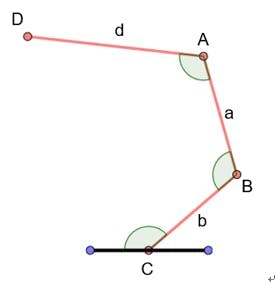
Gegeben:
- C fest
- D = Benutzereingabe (Punkt)
- Segmentlängen CB = b, BA = a, AD = d
Gesucht: Winkel C, B, A
Lösung: Annahme: Winkel B = A = α. Zusatzpunkte/Strecken einfügen:
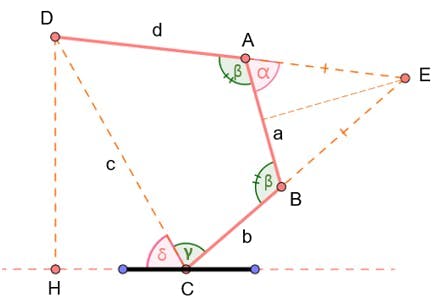
- C, D bekannt → Strecke c = |DC| berechenbar
- Winkel δ berechenbar
- Dreieck ABE: AE = BE, ∠E = π − 2α
- Cosinussatz in CDE → Gleichung (1)
- Cosinussatz in BDC/BDA → Gleichung (2)
- Einsetzen → quadratische Gleichung für α



Vereinfacht:

a, b, c, d bekannt → α lösbar. β = π − α. γ über Cosinussatz in BDC und BDA:
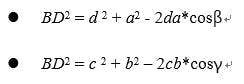
Ergebnis: Motoren 2, 3, 4 Winkel = (δ+γ), β, β.
6. Quellcode
Zwei Dateien:
- RobotArmWeb.ino: Arduino-Code
- remote_arm.php: Web-App (auf PHPoC WiFi Shield hochladen). Zusätzlich Bild
flywheel.pnghochladen.

RobotArmWeb.ino (Arduino)
#include <Phpoc.h>
#include <Servo.h>

int angle_init[] = {90, 101, 165, 153, 90, 120}; // Startwinkel (motorgeometrisch)
int angle_offset[] = {0, 11, -15, -27, 0, 137};  // Offset Web-Winkel → realer Servo
int cur_angles[] = {90, 101, 165, 153, 90, 120};
int dest_angles[] = {0, 0, 0, 0, 0, 0};
int angle_max[] = {180, 180, 160, 120, 180, 137};
int angle_min[] = {0, 0, 0, 20, 0, 75};
int direction[] = {1, 1, 1, 1, 1, -1};
int angleSteps[] = {3, 2, 2, 2, 4, 4}; // Schrittweite pro Motor (Grad)

Servo servo[6];
PhpocServer server(80);
int stepNum = 0;

void setup() {
  Serial.begin(9600);
  Phpoc.begin(PF_LOG_SPI | PF_LOG_NET);
  server.beginWebSocket("remote_arm");
  for (int i = 0; i < 6; i++) {
    servo[i].attach(i + 2); // Pins 2-7
    servo[i].write(angle_init[i]);
  }
}

void loop() {
  PhpocClient client = server.available();
  if (client) {
    String angleStr = client.readLine();
    if (angleStr) {
      Serial.println(angleStr);
      int commaPos1 = -1, commaPos2;
      for (int i = 0; i < 5; i++) {
        commaPos2 = angleStr.indexOf(',', commaPos1 + 1);
        int angle = angleStr.substring(commaPos1 + 1, commaPos2).toInt();
        dest_angles[i] = angle * direction[i] + angle_offset[i];
        commaPos1 = commaPos2;
      }
      int angle5 = angleStr.substring(commaPos1 + 1).toInt();
      dest_angles[5] = angle5 * direction[5] + angle_offset[5];
      stepNum = 0;
      // Schrittzahl berechnen (Maximum aller Motoren)
      for (int i = 0; i < 6; i++) {
        int dif = abs(cur_angles[i] - dest_angles[i]);
        int step = dif / angleSteps[i];
        if (stepNum < step) stepNum = step;
      }
    }
  }
  // Motoren schrittweise bewegen
  if (stepNum > 0) {
    for (int i = 0; i < 6; i++) {
      int angleStepMove = (dest_angles[i] - cur_angles[i]) / stepNum;
      cur_angles[i] += angleStepMove;
      if (cur_angles[i] > angle_max[i]) cur_angles[i] = angle_max[i];
      else if (cur_angles[i] < angle_min[i]) cur_angles[i] = angle_min[i];
      servo[i].write(cur_angles[i]);
    }
    stepNum--;
    delay(20);
  }
}
remote_arm.php (PHP/Web-App)
<!DOCTYPE html>
<html>
<head>
<title>Arduino - Arm Robot - Web</title>
<meta name="viewport" content="width=device-width, initial-scale=0.9">
<style>
  body { text-align: center; }
  canvas { background-color: #FFFFFF; }
</style>
<script>
var MOTOR_1 = 0, MOTOR_2 = 1, MOTOR_3 = 2, MOTOR_4 = 3, MOTOR_5 = 4, MOTOR_6 = 5;
var ARM_LENGTH_1 = 95, ARM_LENGTH_2 = 88, ARM_LENGTH_3 = 155;
var SOLE_WIDTH = 160, SOLE_HEIGHT = 73;
var flywheel_img = new Image(); flywheel_img.src = "flywheel.png";
var zone_A_radius = ARM_LENGTH_1 + ARM_LENGTH_2 + ARM_LENGTH_3;
var pivot_x = zone_A_radius + 5;
var pivot_y = zone_A_radius + 5;
var zone_B_radius = 100;
var zone_B_center_x = pivot_x / 2;
var zone_B_center_y = -(zone_B_radius + SOLE_HEIGHT + 20);
var zone_B_last_angle = 0;
var zone_C_radius = 70;
var zone_C_center_x = -pivot_x / 2;
var zone_C_center_y = -(zone_B_radius + SOLE_HEIGHT + 20);
var zone_C_last_angle = 0;
var zone_D_width = 30, zone_D_height = 200.0;
var zone_D_center_x = 0;
var zone_D_center_y = -(zone_B_radius + SOLE_HEIGHT + 110);
var grip_height = 70, grip_width = 100;
var canvas_width = zone_A_radius * 2 + 10;
var canvas_height = zone_A_radius + SOLE_HEIGHT + zone_B_radius * 2 + 180;
var grip_max_angle = 62.0;
var click_state = 0;
var mouse_xyra = {x:0, y:0, r:0.0, a:0.0};
var angles = [90, 90, 180, 180, 90, 17];
var ws = null, ctx = null, last_time = 0;
var a = 0, b = 0, c = 0;

function init() {
  servo = document.getElementById("servo");
  servo.width = canvas_width; servo.height = canvas_height;
  servo.addEventListener("touchstart", mouse_down);
  servo.addEventListener("touchend", mouse_up);
  servo.addEventListener("touchmove", mouse_move);
  servo.addEventListener("mousedown", mouse_down);
  servo.addEventListener("mouseup", mouse_up);
  servo.addEventListener("mousemove", mouse_move);
  ctx = servo.getContext("2d");
  ctx.translate(pivot_x, pivot_y);
  ctx.rotate(Math.PI);
  // Quadratische Gleichungsparameter für Geometrie
  a = 4 * ARM_LENGTH_1 * ARM_LENGTH_3;
  b = 2 * (ARM_LENGTH_2 * ARM_LENGTH_1 + ARM_LENGTH_2 * ARM_LENGTH_3);
  c = Math.pow(ARM_LENGTH_1, 2) + Math.pow(ARM_LENGTH_2, 2) + Math.pow(ARM_LENGTH_3, 2) - 2 * ARM_LENGTH_1 * ARM_LENGTH_3;
}

function update_view() {
  ctx.clearRect(-canvas_width/2, -SOLE_HEIGHT, canvas_width, canvas_height);
  ctx.save();
  // Zone A zeichnen
  ctx.fillStyle = "#D9D9D9";
  ctx.beginPath(); ctx.arc(0,0,zone_A_radius, 0, 2*Math.PI); ctx.fill();
  ctx.fillStyle = "#FFFFFF";
  ctx.fillRect(-pivot_x, -canvas_height + pivot_y, canvas_width, canvas_height - pivot_y - SOLE_HEIGHT);
  // Arm-Segmente
  ctx.strokeStyle = "#00979D"; ctx.fillStyle = "#FF4500"; ctx.lineWidth = 20;
  ctx.rotate(angles[MOTOR_2] / 180 * Math.PI);
  ctx.beginPath(); ctx.moveTo(0,0); ctx.lineTo(ARM_LENGTH_1,0); ctx.stroke(); draw_pivot(0,0);
  ctx.translate(ARM_LENGTH_1,0);
  ctx.rotate(-Math.PI + angles[MOTOR_3] / 180 * Math.PI);
  ctx.beginPath(); ctx.moveTo(0,0); ctx.lineTo(ARM_LENGTH_2,0); ctx.stroke(); draw_pivot(0,0);
  ctx.translate(ARM_LENGTH_2,0);
  ctx.rotate(-Math.PI + angles[MOTOR_4] / 180 * Math.PI);
  ctx.beginPath(); ctx.moveTo(0,0); ctx.lineTo(ARM_LENGTH_3,0); ctx.stroke(); draw_pivot(0,0);
  ctx.restore();
  // Zone B (Basis)
  ctx.strokeStyle = "#00979D"; ctx.lineWidth = 6;
  var angle = (angles[MOTOR_1] + 45) * Math.PI / 180;
  ctx.save(); ctx.translate(zone_B_center_x, zone_B_center_y); ctx.rotate(angle);
  ctx.drawImage(flywheel_img, -zone_B_radius, -zone_B_radius, zone_B_radius*2, zone_B_radius*2);
  ctx.beginPath(); ctx.arc(0,0,zone_B_radius,0,2*Math.PI); ctx.stroke(); ctx.restore();
  // Zone C (Greifer-Rotation)
  angle = (angles[MOTOR_5] + 45) * Math.PI / 180;
  ctx.save(); ctx.translate(zone_C_center_x, zone_C_center_y); ctx.rotate(angle);
  ctx.drawImage(flywheel_img, -zone_C_radius, -zone_C_radius, zone_C_radius*2, zone_C_radius*2);
  ctx.beginPath(); ctx.arc(0,0,zone_C_radius,0,2*Math.PI); ctx.stroke(); ctx.restore();
  // Zone D (Greifer)
  ctx.fillStyle = "#00DEE6"; ctx.lineWidth = 15;
  var grip_dist = Math.floor(angles[MOTOR_6] / grip_max_angle * zone_D_height);
  ctx.fillRect(zone_D_center_x - zone_D_width/2, zone_D_center_y - zone_D_height/2, zone_D_width, zone_D_height);
  ctx.lineWidth = 1; ctx.strokeStyle = "#FFFFFF";
  // Greiferbacken zeichnen (Gradient)
  var center_x = zone_D_center_x, center_y = zone_D_center_y + grip_dist/2;
  var grd = ctx.createLinearGradient(center_x, center_y, center_x, center_y + grip_height);
  grd.addColorStop(0,"#004A4D"); grd.addColorStop(1,"#b3fcff");
  ctx.fillStyle = grd;
  ctx.beginPath(); ctx.moveTo(center_x + grip_width/2, center_y);
  ctx.bezierCurveTo(center_x + grip_width/4, center_y + grip_height, center_x - grip_width/4, center_y + grip_height, center_x - grip_width/2, center_y);
  ctx.closePath(); ctx.fill(); ctx.stroke();
  center_y = zone_D_center_y - grip_dist/2;
  grd = ctx.createLinearGradient(center_x, center_y, center_x, center_y - grip_height);
  grd.addColorStop(0,"#004A4D"); grd.addColorStop(1,"#b3fcff");
  ctx.fillStyle = grd;
  ctx.beginPath(); ctx.moveTo(center_x + grip_width/2, center_y);
  ctx.bezierCurveTo(center_x + grip_width/4, center_y - grip_height, center_x - grip_width/4, center_y - grip_height, center_x - grip_width/2, center_y);
  ctx.closePath(); ctx.fill(); ctx.stroke();
  ctx.restore();
  // Sockel
  ctx.fillStyle = "#006468";
  ctx.fillRect(-SOLE_WIDTH/2, -SOLE_HEIGHT, SOLE_WIDTH, SOLE_HEIGHT);
}

function event_handler(event) {
  var x, y, r, alpha;
  if (event.touches) {
    x = (event.touches[0].pageX - event.touches[0].target.offsetLeft) - pivot_x;
    y = (event.touches[0].pageY - event.touches[0].target.offsetTop) - pivot_y;
  } else {
    x = event.offsetX - pivot_x; y = event.offsetY - pivot_y;
  }
  x = -x; y = -y;
  // Zone A?
  r = Math.sqrt(x*x + y*y);
  if (r < zone_A_radius && y > -SOLE_HEIGHT) {
    if (x < SOLE_WIDTH/2 && x > -SOLE_WIDTH/2 && y < 0) return false;
    alpha = Math.atan2(y, x); if (alpha < 0) alpha += 2*Math.PI;
    mouse_xyra = {x:x, y:y, r:r, a:alpha};
    return geometric_calculation();
  }
  // Zone B?
  var temp_x = x - zone_B_center_x, temp_y = y - zone_B_center_y;
  var dist = Math.sqrt(temp_x*temp_x + temp_y*temp_y);
  if (dist < zone_B_radius) {
    var ang = Math.atan2(temp_y, temp_x) * 180 / Math.PI;
    if (click_state == 0) zone_B_last_angle = ang;
    else {
      if (Math.abs(ang) > 90 && ang * zone_B_last_angle < 0) {
        zone_B_last_angle = (zone_B_last_angle > 0) ? -180 : 180;
      }
      angles[MOTOR_1] += Math.floor(ang - zone_B_last_angle);
      angles[MOTOR_1] = Math.max(0, Math.min(180, angles[MOTOR_1]));
      zone_B_last_angle = ang;
    }
    return true;
  }
  // Zone C?
  temp_x = x - zone_C_center_x; temp_y = y - zone_C_center_y;
  dist = Math.sqrt(temp_x*temp_x + temp_y*temp_y);
  if (dist < zone_C_radius) {
    var ang = Math.atan2(temp_y, temp_x) * 180 / Math.PI;
    if (click_state == 0) zone_C_last_angle = ang;
    else {
      if (Math.abs(ang) > 90 && ang * zone_C_last_angle < 0) {
        zone_C_last_angle = (zone_C_last_angle > 0) ? -180 : 180;
      }
      angles[MOTOR_5] += Math.floor(ang - zone_C_last_angle);
      angles[MOTOR_5] = Math.max(0, Math.min(180, angles[MOTOR_5]));
      zone_C_last_angle = ang;
    }
    return true;
  }
  // Zone D?
  temp_x = Math.abs(x - zone_D_center_x); temp_y = Math.abs(y - zone_D_center_y);
  if (temp_x < zone_D_width/2 && temp_y < zone_D_height/2) {
    var ang = temp_y / (zone_D_height/2) * grip_max_angle;
    angles[MOTOR_6] = Math.floor(ang);
    return true;
  }
  return false;
}

function geometric_calculation() {
  var c_ = c - Math.pow(mouse_xyra.r, 2);
  var delta = b*b - 4*a*c_;
  if (delta < 0) return false;
  var x1 = (-b + Math.sqrt(delta)) / (2*a);
  var x2 = (-b - Math.sqrt(delta)) / (2*a);
  var x = x1; if (x > 1) return false;
  var alpha = Math.acos(x) * 180 / Math.PI;
  var beta = 180 - alpha;
  var cos_C = (Math.pow(mouse_xyra.r, 2) + Math.pow(ARM_LENGTH_1, 2) - (Math.pow(ARM_LENGTH_2, 2) + Math.pow(ARM_LENGTH_3, 2) + 2*ARM_LENGTH_2*ARM_LENGTH_3*x)) / (2*mouse_xyra.r*ARM_LENGTH_1);
  var angle_C = Math.acos(cos_C);
  var gamma = (angle_C + mouse_xyra.a) % (2*Math.PI) * 180 / Math.PI;
  if (gamma < 0) gamma += 360;
  if (gamma > 180) { var temp = gamma - mouse_xyra.a * 180 / Math.PI; gamma -= 2*temp; beta = 360 - beta; }
  if (gamma < 0 || gamma > 180) return false;
  angles[MOTOR_3] = Math.floor(beta);
  angles[MOTOR_4] = Math.floor(beta);
  angles[MOTOR_2] = Math.floor(gamma);
  return true;
}

function draw_pivot(x, y) {
  ctx.beginPath(); ctx.arc(x,y,10,0,2*Math.PI); ctx.stroke(); ctx.fill();
}

function ws_onmessage(e_msg) { e_msg = e_msg || window.event; }
function ws_onopen() {
  document.getElementById("ws_state").innerHTML = "OPEN";
  document.getElementById("wc_conn").innerHTML = "Disconnect";
  angles_change_notice(); update_view();
}
function ws_onclose() {
  document.getElementById("ws_state").innerHTML = "CLOSED";
  document.getElementById("wc_conn").innerHTML = "Connect";
  ws.onopen = ws.onclose = ws.onmessage = null; ws = null;
}
function wc_onclick() {
  if (!ws) {
    ws = new WebSocket("ws:///remote_arm", "text.phpoc");
    document.getElementById("ws_state").innerHTML = "CONNECTING";
    ws.onopen = ws_onopen; ws.onclose = ws_onclose; ws.onmessage = ws_onmessage;
  } else ws.close();
}
function mouse_down() { if (!ws) return; if (event.touches && event.touches.length > 1) click_state = event.touches.length; if (click_state > 1) return; if (event_handler(event)) { click_state = 1; angles_change_notice(); } event.preventDefault(); }
function mouse_up() { click_state = 0; }
function mouse_move() {
  if (!ws) return;
  var now = Date.now(); if (now - last_time < 50) return; last_time = now;
  if (event.touches && event.touches.length > 1) click_state = event.touches.length;
  if (click_state > 1 || !click_state) return;
  if (event_handler(event)) { click_state = 1; angles_change_notice(); }
  event.preventDefault();
}
function angles_change_notice() {
  if (ws && ws.readyState == 1) { ws.send(angles.join(",") + "\r\n"); update_view(); }
}
window.onload = init; setTimeout(update_view, 500);
</script>
</head>
<body>
<h2>Arduino - Control Arm Robot via Web</h2>
<canvas id="servo"></canvas>
<p>WebSocket : <span id="ws_state">null</span><br></p>
<button id="wc_conn" type="button" onclick="wc_onclick()">Connect</button>
</body>
</html>
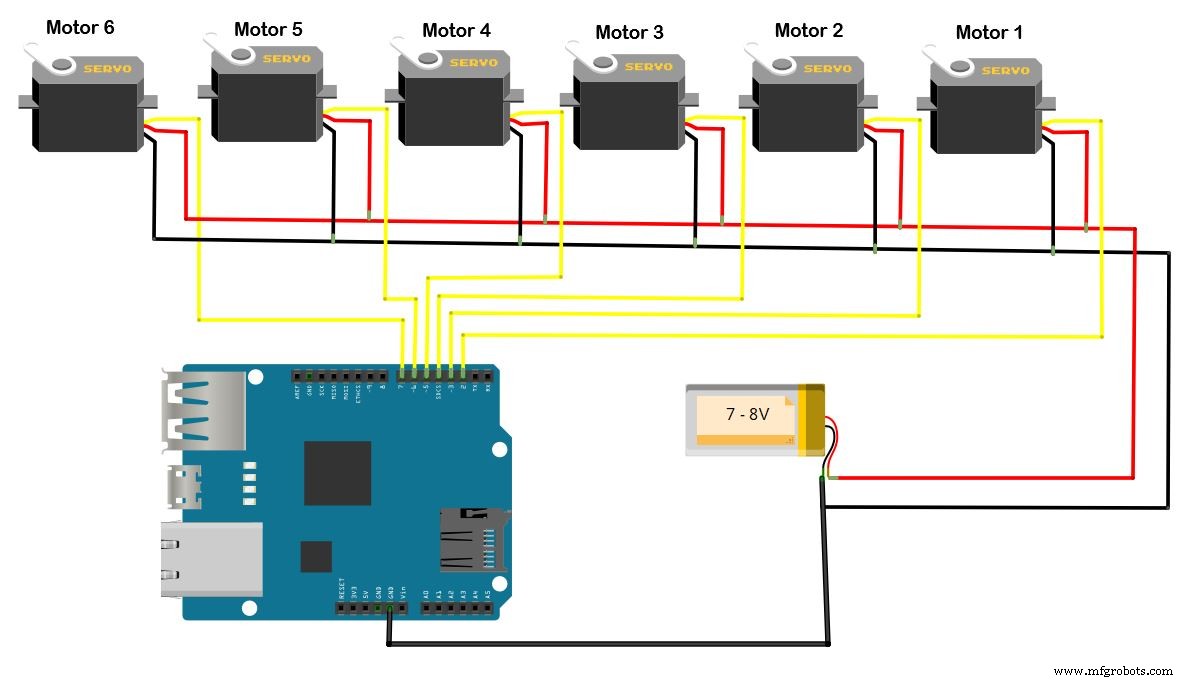
Schaltplan
Externe Stromversorgung für die 6 Motoren erforderlich.
Herstellungsprozess
- Simple Pi Robot: 2-WD Autonomer Rover mit Raspberry Pi bauen
- Arduino Power Control Center: N-FET, P-FET, Relais & RTC Kit
- Fernsteuerung eines Roboterarms per IoT: Eigenbau mit Arduino MKR1000
- Servogesteuerter Hindernisvermeidungs-Roboter: Bauen mit Arduino & HC-SR04
- Autonomer Linienfolger-Roboter mit Arduino UNO
- DIY Arduino Luftbefeuchter-Steuerung mit Relais – Sichere Hochspannungs-Installation
- Arduino UNO & WiFi Shield: Echtzeit-Temperaturanzeige im Web via Serial
- LittleArm 2C: Robuster 3D-gedruckter Arduino-Roboterarm für STEM-Bildung
- Autonomer Hausassistent-Roboter bauen: Komplette Teileliste & Setup-Anleitung
- Smartes Indoor-Navigations-Roboter-Kit für Arduino-Projekte