



Mini-LED-Matrix-Uhr – Arduino Nano Zeitmesser
Komponenten und Zubehör
- 1× Arduino Nano R3
- 1× DS3231M RTC Modul (I2C, ±5 ppm, battergepuffert)
- 1× LED-Matrix-Modul 32×8 (4× 8×8 MAX7219 Kaskade, z. B. AliExpress „4-in-1“)
- 2× Taster (Momentan, für Menü/Einstellung)
- Steckbrett / Lochraster + Jumper
Werkzeuge
- Lötkolben
Software
- Arduino IDE
- Bibliotheken:
LedControl,FontLEDClock,RTClib,Button(Alexander Brevig)
Projektbeschreibung
Basierend auf Nick Halls „Mini Clock“ (4× 8×8 Matrizen) angepasst für das günstige 32×8 MAX7219-Modul (ein Stück, vier Kaskaden). Die Uhr bietet vielfältige Anzeigemodi, Menüsteuerung per zwei Taster und automatische Helligkeitsanpassung.
Funktionen & Anzeigemodi
- Basic Mode: Große 5×7 Ziffern (HH:MM), blinkender Doppelpunkt.
- Slide Mode: Ziffern schieben sich pixelweise ein/aus (konfigurierbare Geschwindigkeit).
- Small Mode: Kleine 3×5 Ziffern mit Sekunden (HH:MM:SS).
- Word Clock: Uhrzeit als Text, z. B. „TEN PAST TWELVE“ (englisch).
- Datumsanzeige: Wochentag, Datum (mit Suffix: 1st, 2nd…), Monat – per Taster abrufbar.
- 12/24 h Umschaltung im Einstellmenü.
- Helligkeit (0–15) per Taster einstellbar.
- Random Mode: Wechselt alle 1–4 Stunden automatisch den Anzeigemodus.

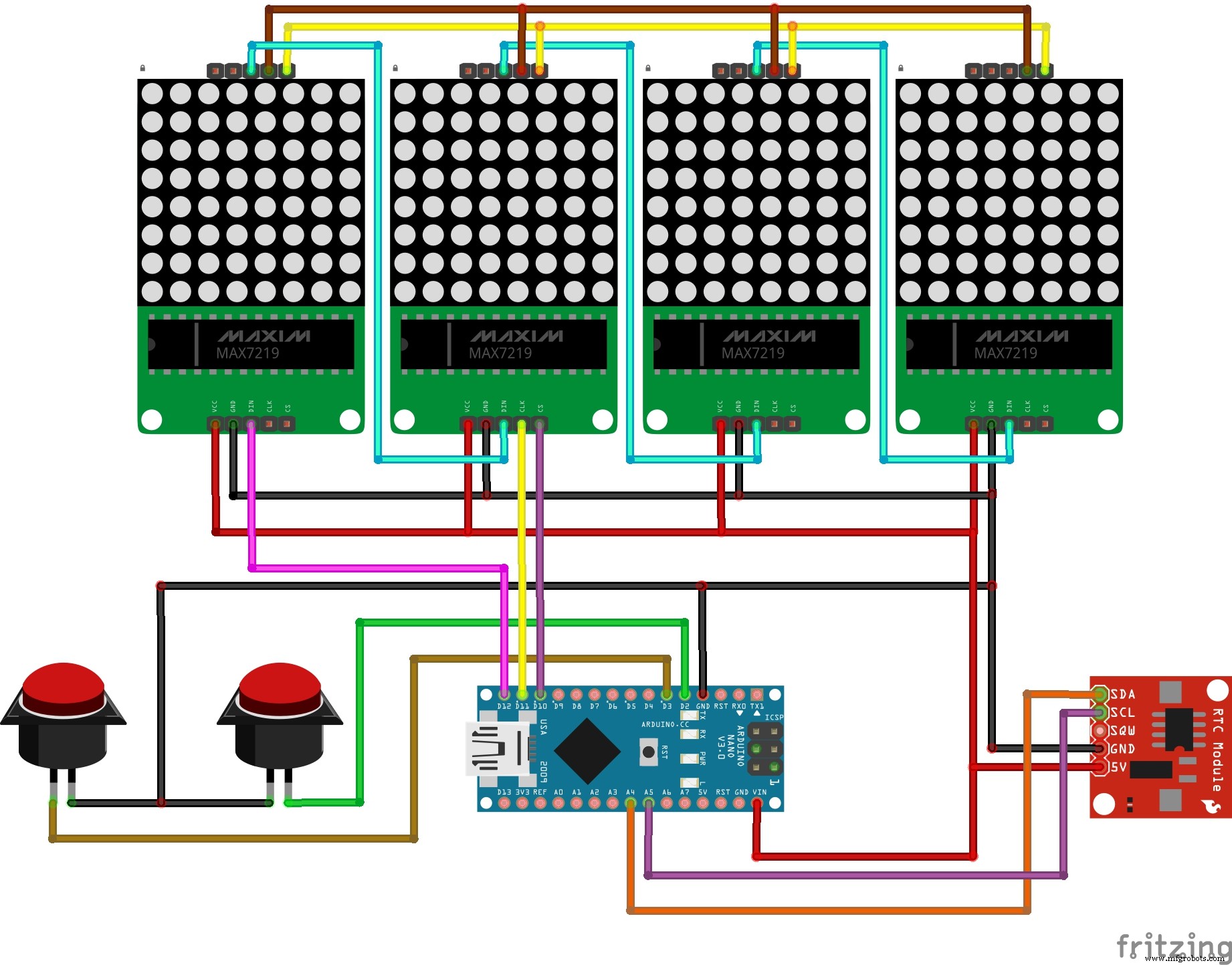
Verdrahtung
| Signal | Arduino Nano Pin | Modul Pin |
|---|---|---|
| DataIn (DIN) | D12 | DIN |
| Clock (CLK) | D11 | CLK |
| Load / CS | D10 | CS |
| RTC SDA | A4 | SDA |
| RTC SCL | A5 | SCL |
| Taster A (Mode) | D2 | – |
| Taster B (Set/Date) | D3 | – |
| VCC / GND | 5V / GND | VCC / GND |
Arduino-Code (Hauptsketch)
Der Code ist eine erweiterte Version von Nick Halls Original. Er nutzt LedControl für die Matrix, RTClib für DS3231, Button für entprellte Taster und eigene Font-Tabellen (FontLEDClock.h) für 5×7 und 3×5 Zeichen. Hauptschleife: Zustandsautomat für Anzeigemodi (clock_mode), Menüs (setup_menu) und Random-Modus.
/***********************************************************************
 Mini Clock v1.0, Jul 2014 by Nick Hall | GPL | https://123led.wordpress.com/
 Angepasst für 32x8 MAX7219 Modul (4 Kaskaden) & Arduino Nano
***********************************************************************/
#include "LedControl.h"
#include    // 5x7 & 3x5 Fonts im PROGMEM
#include
#include "RTClib.h"         // DS3231/DS1307
#include          // Entprellte Taster

// Matrix: DIN=12, CLK=11, LOAD=10, 4 Devices
LedControl lc = LedControl(12, 11, 10, 4);

byte intensity = 7;          // Default Helligkeit 0-15
byte clock_mode = 0;         // 0=Basic, 1=Small, 2=Slide, 3=Word, 4=Setup
bool random_mode = false;
byte old_mode = 0;
bool ampm = false;           // false=24h, true=12h
byte change_mode_time = 0;   // Stunde für Random-Modus-Wechsel
unsigned long delaytime = 500;
int rtc[7];                  // [sec, min, hour, dow, date, month, year]
char days[7][4] = {"Sun","Mon","Tue","Wed","Thu","Fri","Sat"};
char daysfull[7][9] = {"Sunday","Monday","Tuesday","Wednesday","Thursday","Friday","Saturday"};
char suffix[4][3] = {"st","nd","rd","th"};

#define NUM_DISPLAY_MODES 3
#define NUM_SETTINGS_MODES 4
#define SLIDE_DELAY 20       // ms pro Slide-Schritt
#define cls clear_display

RTC_DS1307 ds1307;
Button buttonA = Button(2, BUTTON_PULLUP); // Mode
Button buttonB = Button(3, BUTTON_PULLUP); // Set/Date

void setup() {
  pinMode(2, INPUT_PULLUP); pinMode(3, INPUT_PULLUP); pinMode(4, INPUT_PULLUP);
  Serial.begin(9600);
  for (int addr=0; addr<4; addr++) {
    lc.shutdown(addr, false);
    lc.setIntensity(addr, intensity);
    lc.clearDisplay(addr);
  }
  Wire.begin();
  ds1307.begin();
  if (!ds1307.isrunning()) {
    Serial.println("RTC nicht aktiv! Setze Compile-Zeit.");
    ds1307.adjust(DateTime(__DATE__, __TIME__));
  }
  printver(); // Startanimation
  digitalWrite(13, HIGH); // LED on
}

void loop() {
  switch (clock_mode) {
    case 0: basic_mode(); break;
    case 1: small_mode(); break;
    case 2: slide(); break;
    case 3: word_clock(); break;
    case 4: setup_menu(); break;
  }
}

// --- Low-Level Matrix Funktionen ---
void plot(byte x, byte y, byte val) {
  byte addr; if (x<8) addr=3; else if (x<16) {addr=2; x-=8;} else if (x<24) {addr=1; x-=16;} else {addr=0; x-=24;}
  lc.setLed(addr, y, x, val);
}
void clear_display() { for(byte a=0;a<4;a++) lc.clearDisplay(a); }
void fade_down() { for(byte i=intensity;i>0;i--){ for(byte a=0;a<4;a++) lc.setIntensity(a,i); delay(30);} clear_display(); for(byte a=0;a<4;a++) lc.setIntensity(a,intensity); }

// Font-Rendering (5x7 & 3x5) via plot()...
void puttinychar(byte x, byte y, char c) { /* 3x5 Font aus FontLEDClock.h */ }
void putnormalchar(byte x, byte y, char c) { /* 5x7 Font aus FontLEDClock.h */ }

// --- Anzeigemodi ---
void basic_mode() { /* große 5x7 Ziffern, blinkender Doppelpunkt, Taster: Mode/Date */ }
void small_mode() { /* 3x5 Ziffern mit Sekunden */ }
void slide() { /* Slide-Animation für Ziffernwechsel */ }
void word_clock() { /* Uhrzeit als englische Textphrasen */ }
void display_date() { /* Wochentag, Datum+Suffix, Monat – jeweils 1s mit Fade */ }

// --- Menüs ---
void switch_mode() { /* Durch Modi 0-3 + Setup (4) blättern */ }
byte run_mode() { /* Prüft Random-Modus Wechselstunde */ }
void set_next_random() { change_mode_time = rtc[2] + random(1,5); if(change_mode_time>23) change_mode_time=random(1,4); clock_mode=random(0, NUM_DISPLAY_MODES+1); }
void setup_menu() { /* Random, 12/24h, TimeSet, Brightness, Exit */ }
void set_random() { random_mode = !random_mode; if(random_mode) set_next_random(); /* Msg anzeigen */ }
void set_ampm() { ampm = !ampm; cls(); }
void set_intensity() { /* Taster B gedrückt: Helligkeit 0-15 hochzählen, Balkenanzeige */ }
void set_time() { /* Minuten, Stunde, Tag, Monat, Jahr per Taster B hochzählen, Taster A bestätigt */ }
void get_time() { DateTime now=ds1307.now(); rtc[6]=now.year(); rtc[5]=now.month(); rtc[4]=now.day(); rtc[3]=now.dayOfWeek(); rtc[2]=now.hour(); rtc[1]=now.minute(); rtc[0]=now.second(); }

// Startanimation: Version + "Hello!" + LED-Test
void printver() { /* ... */ }

// Slide-Animation Helper
void slideanim(byte x, byte y, byte seq, char cur, char nxt) { /* 9 Frames: cur raus, nxt rein */ }

// Farbwheel für Rainbow (nicht genutzt, aber vorhanden)
uint32_t colorWheel(byte pos) { /* ... */ }
Hinweis: Die vollständigen Font-Tabellen (FontLEDClock.h) und die detaillierten Modus-Funktionen (basic_mode, slide, word_clock etc.) sind im herunterladbaren Bibliotheken-Archiv enthalten. Der obige Code zeigt die Struktur und die wichtigsten Logik-Blöcke.
Bibliotheken & Downloads
LedControl.h– MAX7219 SteuerungFontLEDClock.h– 5×7 & 3×5 Fonts (PROGMEM)RTClib.h– DS3231/DS1307Button.h– Entprellte Taster
Alle Bibliotheken im Code-Bereich als Download verfügbar.
Herstellungsprozess
- LED-Sequenzer mit 555-Timer & 4017-Zähler bauen – Frequenzteilung & Entprellung
- Kuckucksuhr: Geschichte, Handwerkskunst und moderne Evolution
- MATLAB Matrizen Grundlagen: Erstellen, Referenzieren, Manipulieren
- Arduino Mini Boss-Battle-Spiel – Retro-RPG auf 16×2 LCD
- Einen eigenen LED-Master-Clock mit Alarm bauen – aus 12 Metern Entfernung ablesbar
- Berlin-Uhr mit Arduino UNO bauen – DIY LED-Matrix-Uhr
- Analog-Style LED Persistence-of-Vision Uhr – DIY Arduino Nano Projekt
- Interaktive LED-Matrix Tür-Anzeige mit PIR-Bewegungssensor – Arduino Feiertagsgruß
- Soundgesteuerte 8-LED-Lichtanzeige mit Arduino
- Intelligenten Arduino-Vierbeiner-Roboter bauen: Schritt-für-Schritt-Anleitung