



Mini CNC 2D-Plotter aus ausgedientem DVD-Laufwerk mit L293D Motor Shield
Komponenten und Zubehör
| Arduino UNO | × | 1 |
| L293D Motor Shield | × | 1 |
| Tower Pro Servo Motor 9g | × | 1 |
| Ausgedientes DVD-Laufwerk | × | 1 |
| Jumper Kabel (generic) | × | 1 |
Apps und Online-Dienste
- Arduino IDE
- Processing IDE
- Inkscape
Projektbeschreibung
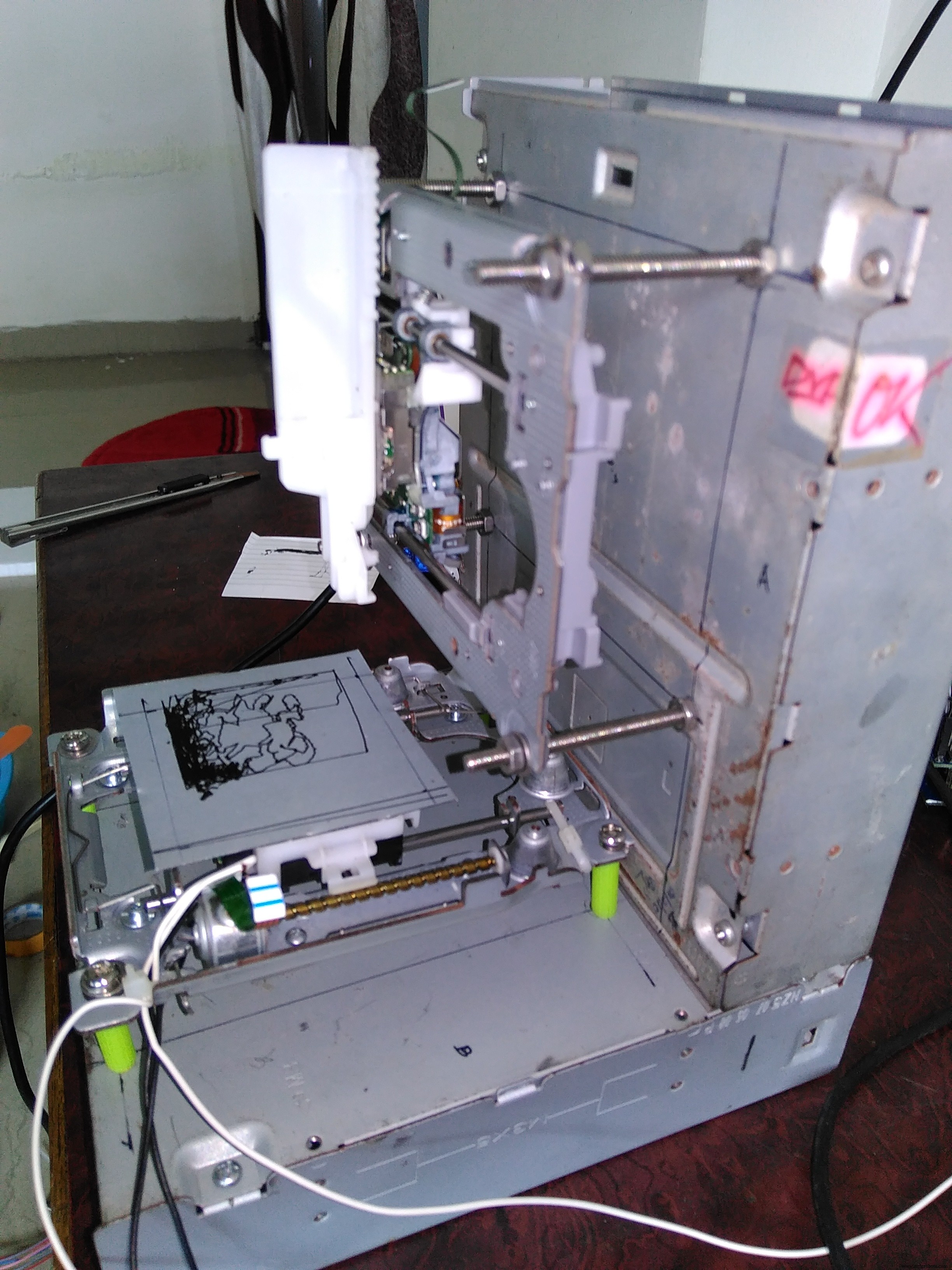
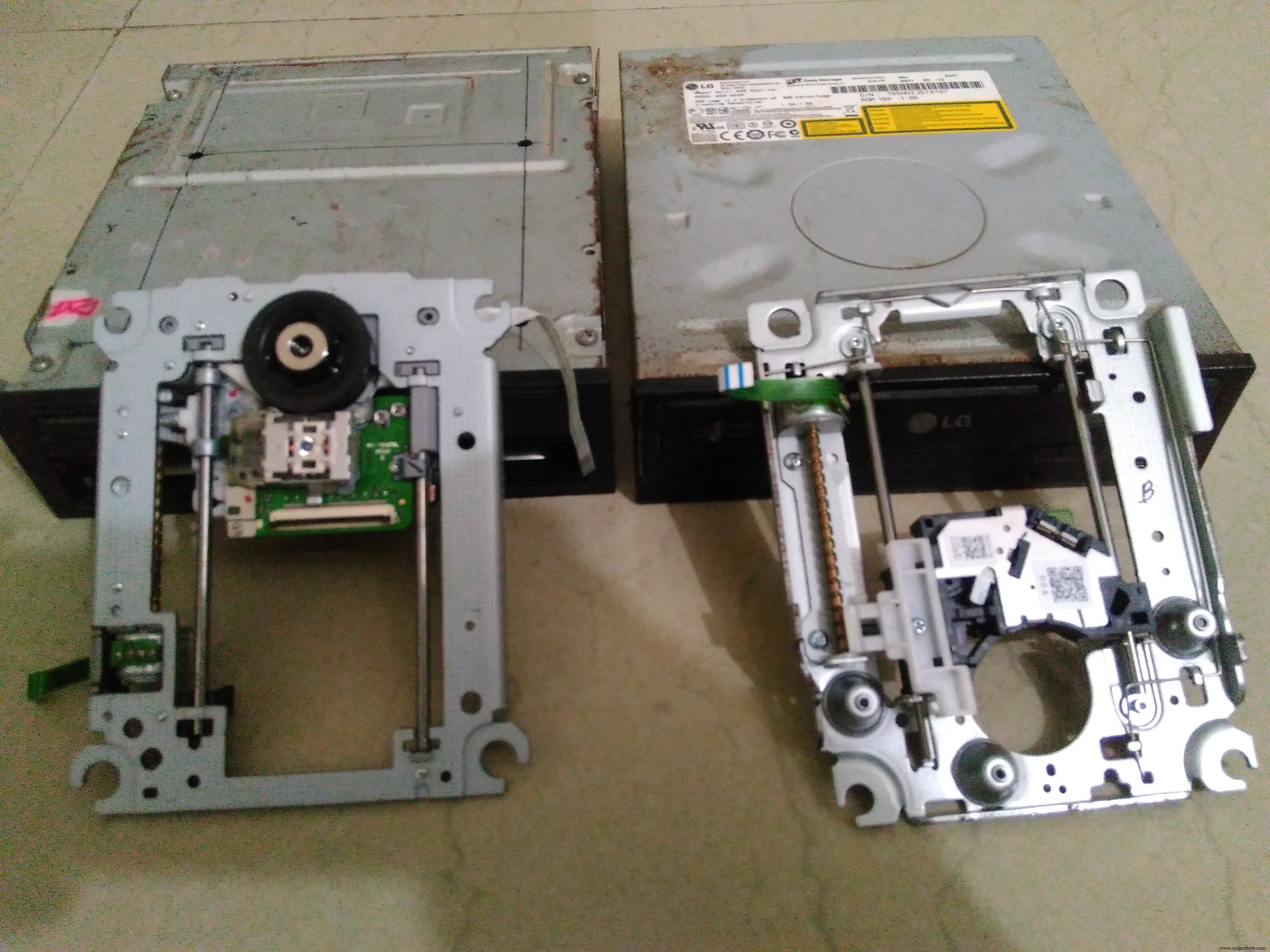
Zwei ausgediente DVD-Laufwerke wie im Bild angeordnet
- Arduino IDE herunterladen
- Processing IDE herunterladen
- Arduino IDE öffnen und Code von hier laden
- Processing IDE öffnen und Code von hier laden
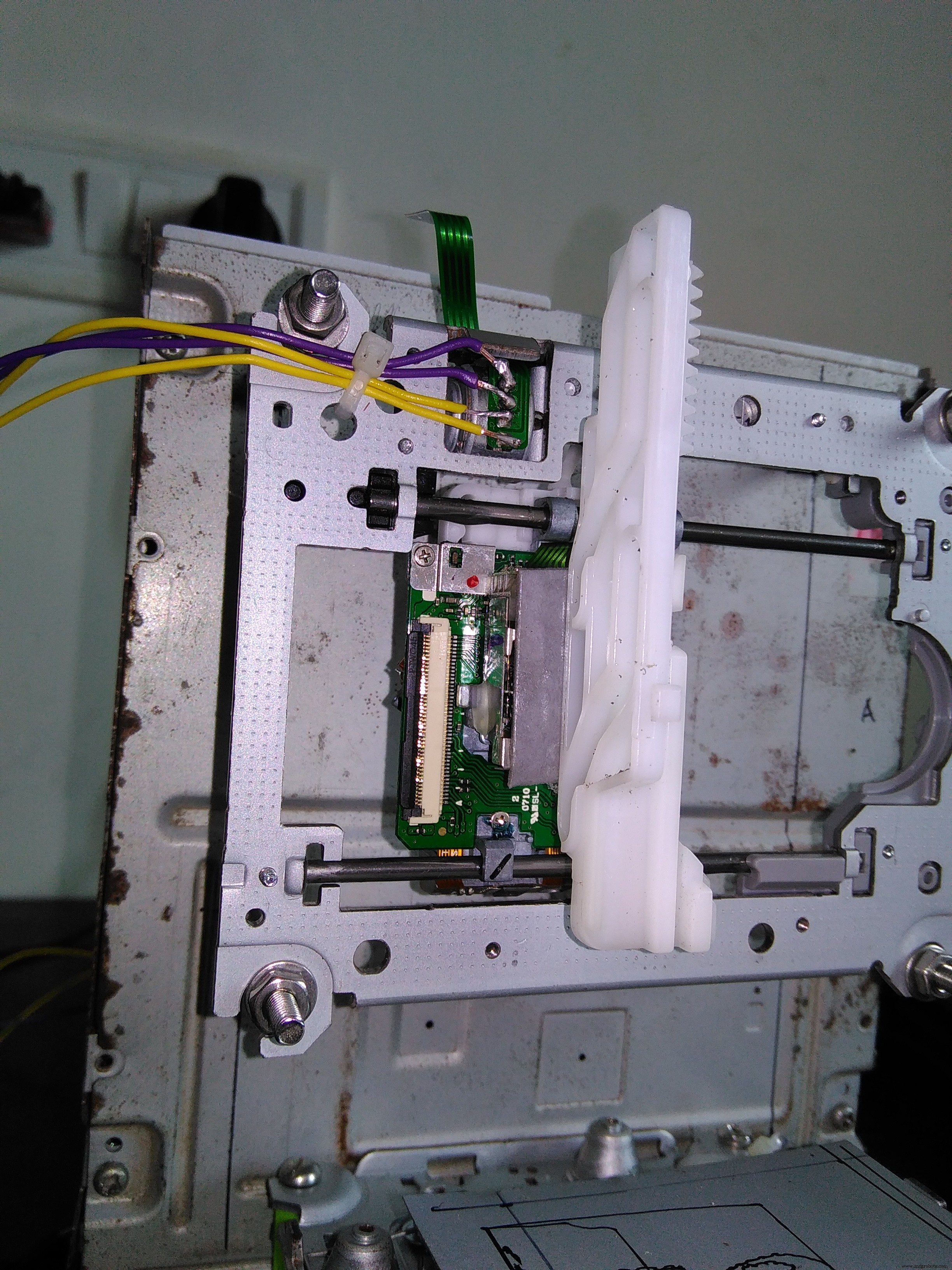
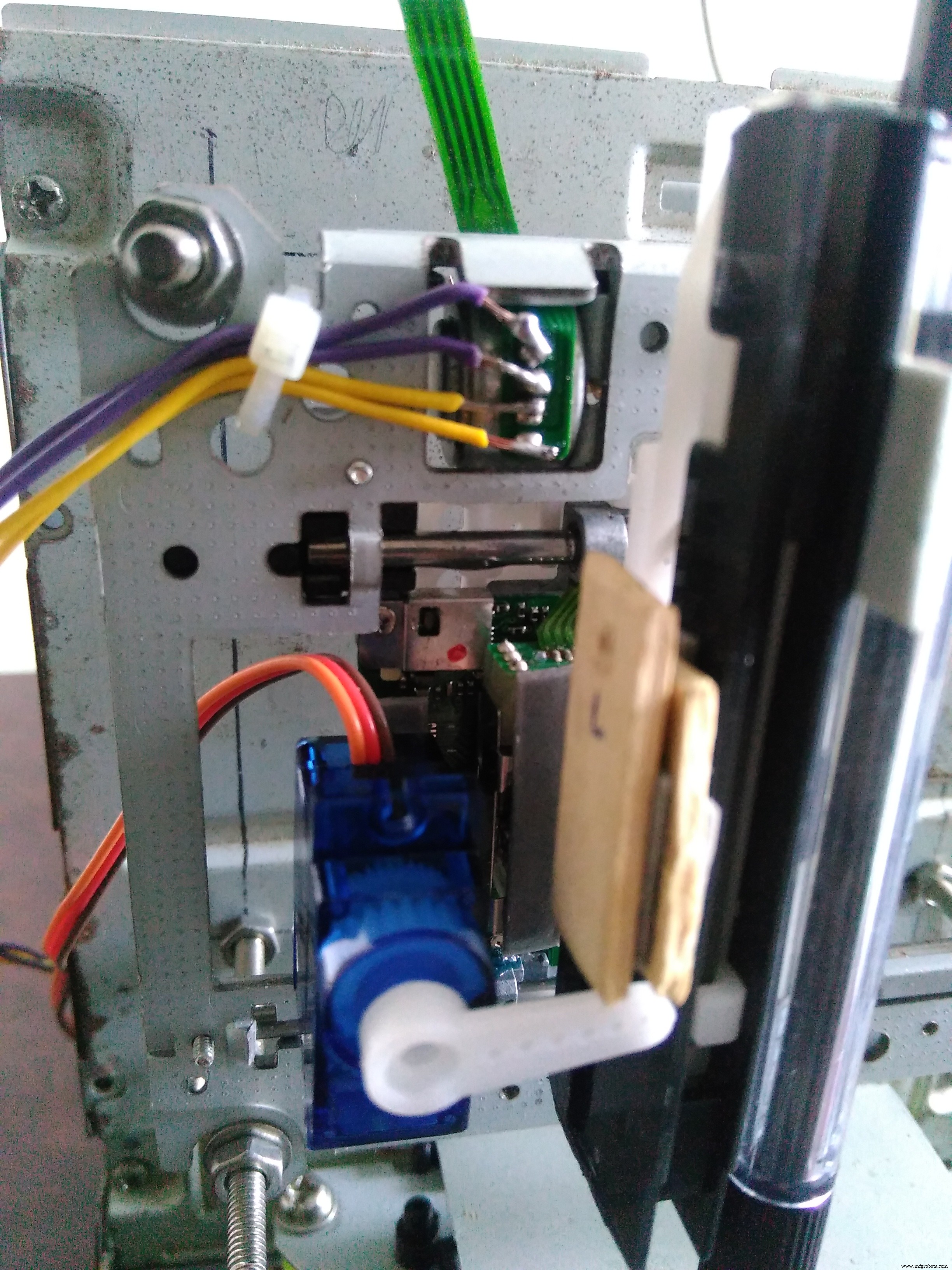
Ausgedientes DVD-Laufwerk öffnen, internen Schlitten (mit Schrittmotor-Mechanik) entnehmen. Dieser dient als X- und Y-Achse. Bilder beachten für Montage. Loch in leeres DVD-Gehäuse bohren, X- und Y-Achse mit Schrauben/Muttern am jeweiligen Gehäuse befestigen.
Beide Achsen senkrecht zueinander ausrichten.
G-Code
Für G-Code-Dateien, die mit diesem CNC-Plotter kompatibel sind, wird Inkscape benötigt.
Inkscape: Professionelle Vektorgrafik-Software (Windows, Mac, Linux). Nutzung durch Designer & Hobbyisten für Illustrationen, Icons, Logos, Diagramme, Karten, Webgrafiken. Nutzt W3C-Standard SVG als natives Format, frei & Open Source. Download: inkscape.org.
Wichtig: Version 0.48.5 herunterladen! Add-on für G-Code-Export installieren: hier mit Installationshinweisen.
Video-Tutorial auf YouTube ansehen: G-Code-Datei erstellen.
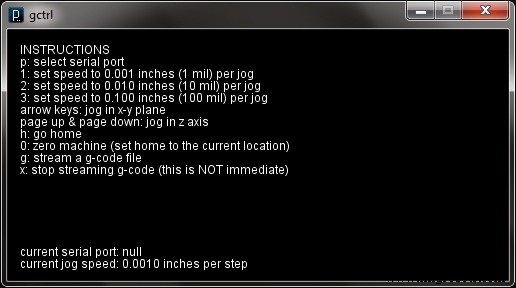
- gctrl-Datei in Processing IDE laden, Play-Button klicken.
- 'p' drücken → Kommunikationsport wählen
- Optional: Jog-Speed mit '1', '2', '3' setzen
- 'g' drücken → G-Code-Datei laden
- Enter drücken → Plotter startet
Plotter ist bereit. Fertige G-Code-Beispiele:
Danke für Ihre Aufmerksamkeit! Vollständige Anleitung hier.



Video zur Live-Demo:
Code
- Arduino CNC Code
- Processing Code
Arduino CNC Code Arduino
#include <Servo.h>
#include <AFMotor.h>

#define LINE_BUFFER_LENGTH 512
char STEP = MICROSTEP;

// Servo Positionen für Stift hoch/runter
const int penZUp = 95;
const int penZDown = 83;

// Servo an PWM Pin 10
const int penServoPin = 10;

// Für DVD-Schrittmotoren passend, aber nicht kritisch
const int stepsPerRevolution = 48;

Servo penServo;

// Stepper für X- und Y-Achse über L293D H-Brücke
AF_Stepper myStepperY(stepsPerRevolution, 1);
AF_Stepper myStepperX(stepsPerRevolution, 2);

struct point { float x; float y; float z; };
struct point actuatorPos;

float StepInc = 1;
int StepDelay = 0;
int LineDelay = 0;
int penDelay = 50;

float StepsPerMillimeterX = 100.0;
float StepsPerMillimeterY = 100.0;

float Xmin = 0, Xmax = 40;
float Ymin = 0, Ymax = 40;
float Zmin = 0, Zmax = 1;
float Xpos = Xmin, Ypos = Ymin, Zpos = Zmax;

boolean verbose = false;

void setup() {
  Serial.begin(9600);
  penServo.attach(penServoPin);
  penServo.write(penZUp);
  delay(100);
  myStepperX.setSpeed(600);
  myStepperY.setSpeed(600);

  Serial.println("Mini CNC Plotter alive and kicking!");
  Serial.print("X range is from "); Serial.print(Xmin); Serial.print(" to "); Serial.print(Xmax); Serial.println(" mm.");
  Serial.print("Y range is from "); Serial.print(Ymin); Serial.print(" to "); Serial.print(Ymax); Serial.println(" mm.");
}

void loop() {
  delay(100);
  char line[LINE_BUFFER_LENGTH];
  char c;
  int lineIndex = 0;
  bool lineIsComment = false, lineSemiColon = false;

  while (1) {
    while (Serial.available() > 0) {
      c = Serial.read();
      if (c == '\n' || c == '\r') {
        if (lineIndex > 0) {
          line[lineIndex] = '\0';
          if (verbose) { Serial.print("Received: "); Serial.println(line); }
          processIncomingLine(line, lineIndex);
          lineIndex = 0;
        } else {
          // Leere/Comment-Zeile überspringen
        }
        lineIsComment = false; lineSemiColon = false;
        Serial.println("ok");
      } else {
        if (lineIsComment || lineSemiColon) {
          if (c == ')') lineIsComment = false;
        } else {
          if (c <= ' ') { /* Whitespace ignorieren */ }
          else if (c == '/') { /* Block delete nicht unterstützt */ }
          else if (c == '(') { lineIsComment = true; }
          else if (c == ';') { lineSemiColon = true; }
          else if (lineIndex >= LINE_BUFFER_LENGTH - 1) {
            Serial.println("ERROR - lineBuffer overflow");
            lineIsComment = false; lineSemiColon = false;
          }
          else if (c >= 'a' && c <= 'z') {
            line[lineIndex++] = c - 'a' + 'A'; // Uppercase
          } else {
            line[lineIndex++] = c;
          }
        }
      }
    }
  }
}

void processIncomingLine(char* line, int charNB) {
  int currentIndex = 0;
  char buffer[64];
  struct point newPos = {0, 0, 0};

  while (currentIndex < charNB) {
    switch (line[currentIndex++]) {
      case 'U': penUp(); break;
      case 'D': penDown(); break;
      case 'G':
        buffer[0] = line[currentIndex++];
        buffer[1] = '\0';
        switch (atoi(buffer)) {
          case 0: // G00
          case 1: // G01
            // X vor Y angenommen
            char* indexX = strchr(line + currentIndex, 'X');
            char* indexY = strchr(line + currentIndex, 'Y');
            if (indexY <= 0) {
              newPos.x = atof(indexX + 1);
              newPos.y = actuatorPos.y;
            } else if (indexX <= 0) {
              newPos.y = atof(indexY + 1);
              newPos.x = actuatorPos.x;
            } else {
              newPos.y = atof(indexY + 1);
              *indexY = '\0';
              newPos.x = atof(indexX + 1);
            }
            drawLine(newPos.x, newPos.y);
            actuatorPos.x = newPos.x;
            actuatorPos.y = newPos.y;
            break;
        }
        break;
      case 'M':
        buffer[0] = line[currentIndex++];
        buffer[1] = line[currentIndex++];
        buffer[2] = line[currentIndex++];
        buffer[3] = '\0';
        switch (atoi(buffer)) {
          case 300: {
            char* indexS = strchr(line + currentIndex, 'S');
            float Spos = atof(indexS + 1);
            if (Spos == 30) penDown();
            if (Spos == 50) penUp();
            break;
          }
          case 114: // M114 Position melden
            Serial.print("Absolute position: X = "); Serial.print(actuatorPos.x);
            Serial.print(" - Y = "); Serial.println(actuatorPos.y);
            break;
          default:
            Serial.print("Command not recognized: M"); Serial.println(buffer);
        }
        break;
    }
  }
}

void drawLine(float x1, float y1) {
  if (verbose) { Serial.print("fx1, fy1: "); Serial.print(x1); Serial.print(","); Serial.print(y1); Serial.println(); }

  // Begrenzung
  if (x1 >= Xmax) x1 = Xmax;
  if (x1 <= Xmin) x1 = Xmin;
  if (y1 >= Ymax) y1 = Ymax;
  if (y1 <= Ymin) y1 = Ymin;

  if (verbose) { Serial.print("Xpos, Ypos: "); Serial.print(Xpos); Serial.print(","); Serial.print(Ypos); Serial.println(); }
  if (verbose) { Serial.print("x1, y1: "); Serial.print(x1); Serial.print(","); Serial.print(y1); Serial.println(); }

  // Koordinaten in Steps
  x1 = (int)(x1 * StepsPerMillimeterX);
  y1 = (int)(y1 * StepsPerMillimeterY);
  float x0 = Xpos, y0 = Ypos;

  long dx = abs(x1 - x0);
  long dy = abs(y1 - y0);
  int sx = (x0 < x1) ? StepInc : -StepInc;
  int sy = (y0 < y1) ? StepInc : -StepInc;
  long i, over = 0;

  if (dx > dy) {
    for (i = 0; i < dx; ++i) {
      myStepperX.onestep(sx, STEP);
      over += dy;
      if (over >= dx) { over -= dx; myStepperY.onestep(sy, STEP); }
      delay(StepDelay);
    }
  } else {
    for (i = 0; i < dy; ++i) {
      myStepperY.onestep(sy, STEP);
      over += dx;
      if (over >= dy) { over -= dy; myStepperX.onestep(sx, STEP); }
      delay(StepDelay);
    }
  }

  if (verbose) { Serial.print("dx, dy: "); Serial.print(dx); Serial.print(","); Serial.print(dy); Serial.println(); }
  if (verbose) { Serial.print("Going to ("); Serial.print(x0); Serial.print(","); Serial.print(y0); Serial.println(")"); }

  delay(LineDelay);
  Xpos = x1; Ypos = y1;
}

void penUp() {
  penServo.write(penZUp);
  delay(penDelay);
  Zpos = Zmax;
  digitalWrite(15, LOW); digitalWrite(16, HIGH);
  if (verbose) Serial.println("Pen up!");
}

void penDown() {
  penServo.write(penZDown);
  delay(penDelay);
  Zpos = Zmin;
  digitalWrite(15, HIGH); digitalWrite(16, LOW);
  if (verbose) Serial.println("Pen down.");
}
Processing Code Java
import java.awt.event.KeyEvent;
import javax.swing.JOptionPane;
import processing.serial.*;

Serial port = null;
String portname = null; // null = interaktiv ('p' im Programm)
// String portname = Serial.list()[0]; // Mac OS X
// String portname = "/dev/ttyUSB0"; // Linux
// String portname = "COM6"; // Windows

boolean streaming = false;
float speed = 0.001;
String[] gcode;
int i = 0;

void openSerialPort() {
  if (portname == null) return;
  if (port != null) port.stop();
  port = new Serial(this, portname, 9600);
  port.bufferUntil('\n');
}

void selectSerialPort() {
  String result = (String) JOptionPane.showInputDialog(frame,
    "Select the serial port that corresponds to your Arduino board.",
    "Select serial port", JOptionPane.QUESTION_MESSAGE, null, Serial.list(), 0);
  if (result != null) { portname = result; openSerialPort(); }
}

void setup() {
  size(500, 250);
  openSerialPort();
}

void draw() {
  background(0); fill(255);
  int y = 24, dy = 12;
  text("INSTRUCTIONS", 12, y); y += dy;
  text("p: select serial port", 12, y); y += dy;
  text("1: set speed to 0.001 inches (1 mil) per jog", 12, y); y += dy;
  text("2: set speed to 0.010 inches (10 mil) per jog", 12, y); y += dy;
  text("3: set speed to 0.100 inches (100 mil) per jog", 12, y); y += dy;
  text("arrow keys: jog in x-y plane", 12, y); y += dy;
  text("page up & page down: jog in z axis", 12, y); y += dy;
  text("$: display grbl settings", 12, y); y += dy;
  text("h: go home", 12, y); y += dy;
  text("0: zero machine (set home to current location)", 12, y); y += dy;
  text("g: stream a g-code file", 12, y); y += dy;
  text("x: stop streaming g-code (NOT immediate)", 12, y); y += dy;
  y = height - dy;
  text("current jog speed: " + speed + " inches per step", 12, y); y -= dy;
  text("current serial port: " + portname, 12, y); y -= dy;
}

void keyPressed() {
  if (key == '1') speed = 0.001;
  if (key == '2') speed = 0.01;
  if (key == '3') speed = 0.1;

  if (!streaming) {
    if (keyCode == LEFT)  port.write("G91\nG20\nG00 X-" + speed + " Y0.000 Z0.000\n");
    if (keyCode == RIGHT) port.write("G91\nG20\nG00 X" + speed + " Y0.000 Z0.000\n");
    if (keyCode == UP)    port.write("G91\nG20\nG00 X0.000 Y" + speed + " Z0.000\n");
    if (keyCode == DOWN)  port.write("G91\nG20\nG00 X0.000 Y-" + speed + " Z0.000\n");
    if (keyCode == KeyEvent.VK_PAGE_UP)   port.write("G91\nG20\nG00 X0.000 Y0.000 Z" + speed + "\n");
    if (keyCode == KeyEvent.VK_PAGE_DOWN) port.write("G91\nG20\nG00 X0.000 Y0.000 Z-" + speed + "\n");
    if (key == 'h') port.write("G90\nG20\nG00 X0.000 Y0.000 Z0.000\n");
    if (key == 'v') port.write("$0=75\n$1=74\n$2=75\n");
    if (key == 's') port.write("$3=10\n");
    if (key == 'e') port.write("$16=1\n");
    if (key == 'd') port.write("$16=0\n");
    if (key == '0') openSerialPort();
    if (key == 'p') selectSerialPort();
    if (key == '$') port.write("$$\n");
  }

  if (!streaming && key == 'g') {
    gcode = null; i = 0;
    File file = null;
    println("Loading file...");
    selectInput("Select a file to process:", "fileSelected", file);
  }
  if (key == 'x') streaming = false;
}

void fileSelected(File selection) {
  if (selection == null) { println("Window closed or cancelled."); }
  else {
    println("User selected " + selection.getAbsolutePath());
    gcode = loadStrings(selection.getAbsolutePath());
    if (gcode == null) return;
    streaming = true; stream();
  }
}

void stream() {
  if (!streaming) return;
  while (true) {
    if (i == gcode.length) { streaming = false; return; }
    if (gcode[i].trim().length() == 0) i++; else break;
  }
  println(gcode[i]);
  port.write(gcode[i] + '\n');
  i++;
}

void serialEvent(Serial p) {
  String s = p.readStringUntil('\n');
  println(s.trim());
  if (s.trim().startsWith("ok")) stream();
  if (s.trim().startsWith("error")) stream(); // XXX: really?
}
Schaltpläne
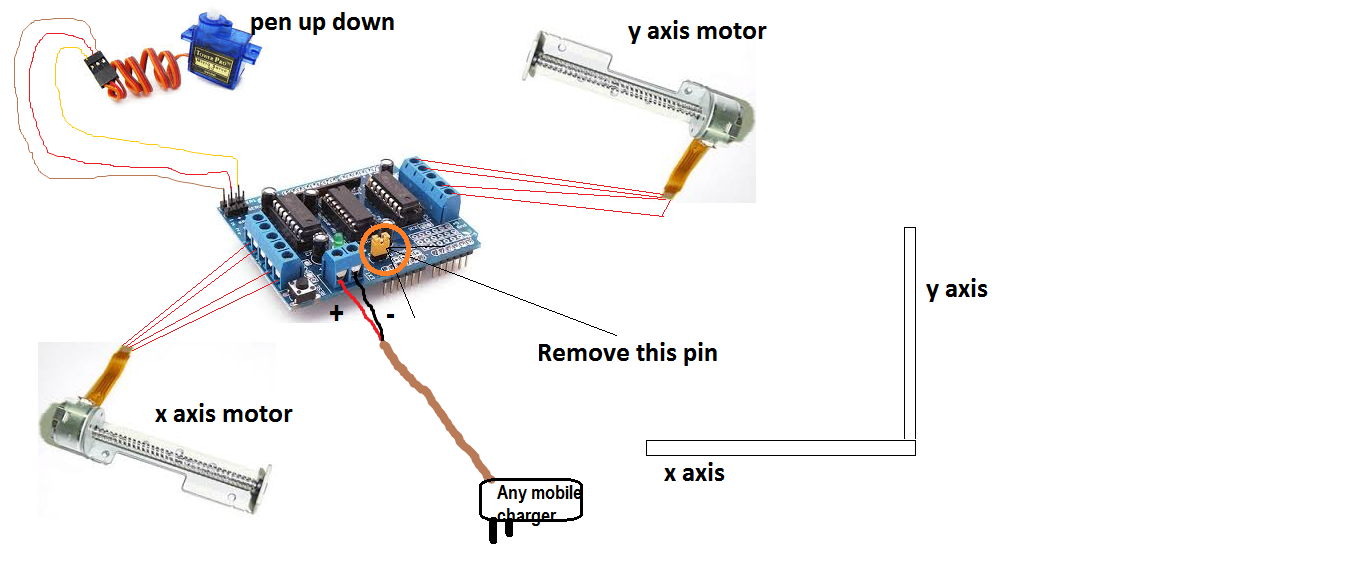
Alle Komponenten wie in Abbildung verbinden:
Herstellungsprozess
- DIY Hausaufgaben-Schreibmaschine zu Hause bauen
- Monitor-Ambilight selbst bauen mit Arduino Nano & WS2812B LEDs
- Arduino-Uno-Roboter zur Personenerkennung – Sensorintegration Schritt für Schritt
- Android-gesteuertes Roboterfahrzeug mit Raspberry Pi Motor Shield
- Selbstbau: Schlagbare, anpassbare Tasten mit Arduino und Piezo-Element
- Erdmassen-Messung mit Arduino: Schritt-für-Schritt DIY-Anleitung
- PHP-Webinterface zur Steuerung des Arduino Uno – Komplettanleitung
- Musikalische Töne mit Arduino erzeugen: Schritt-für-Schritt-Anleitung
- Automatische Tür mit Arduino & Ultraschallsensor bauen
- Digitaler Kompass in Echtzeit mit Arduino & Processing bauen