



MPU6050 Beschleunigungs- & Gyrosensor mit Arduino: Tutorial
Übersicht
In diesem Tutorial lernen Sie den MPU6050 (3-Achsen-Beschleunigungsmesser + 3-Achsen-Gyroskop = 6 DOF IMU) mit Arduino zu nutzen. Zwei Praxisbeispiele:
- 3D-Visualisierung der Orientierung mit Processing
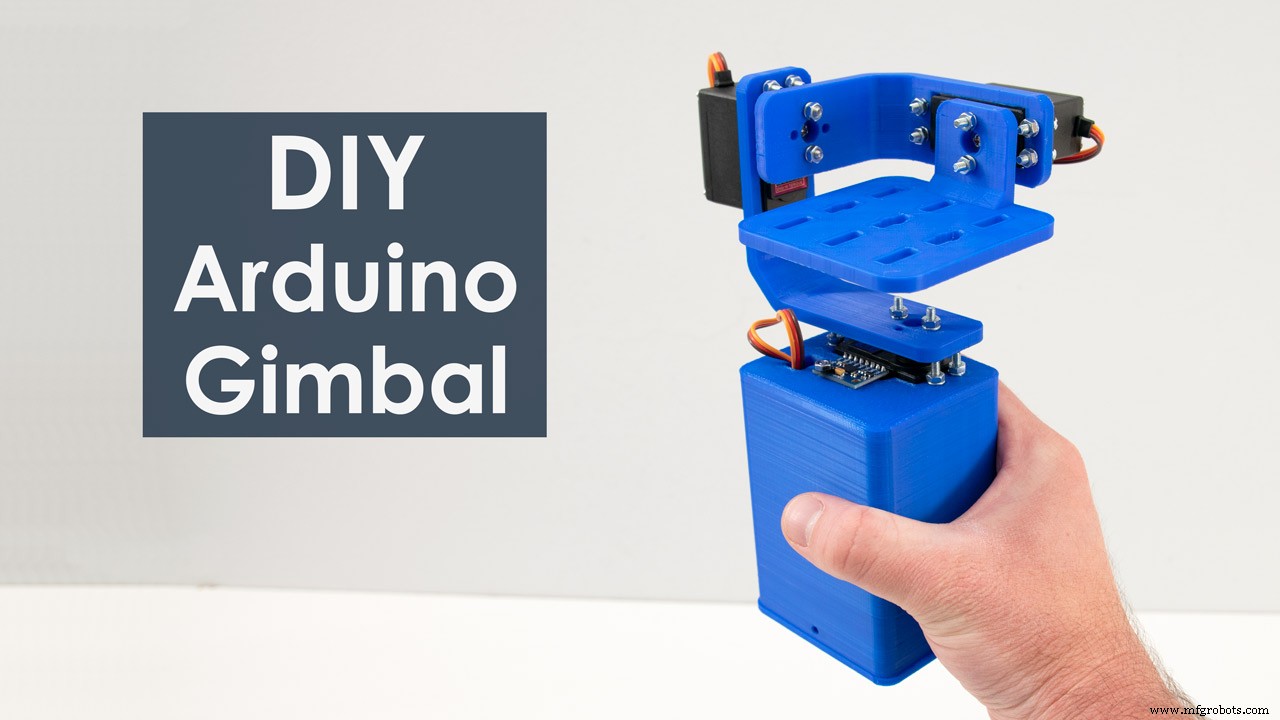
- Selbststabilisierende Plattform (DIY Gimbal) mit 3 Servos basierend auf gefussten Sensordaten
Funktionsweise
MPU6050 integriert beide Sensoren auf einem Chip:
- Gyroskop: Misst Winkelgeschwindigkeit (°/s) um X, Y, Z. MEMS + Coriolis-Effekt. Integration → Winkelposition. Driftet langfristig.
- Beschleunigungsmesser: Misst Erdbeschleunigung (1 g = 9,81 m/s²) an 3 Achsen. Trigonometrie → Neigungswinkel (Roll, Pitch). Empfindlich gegenüber Erschütterungen/linearen Beschleunigungen.
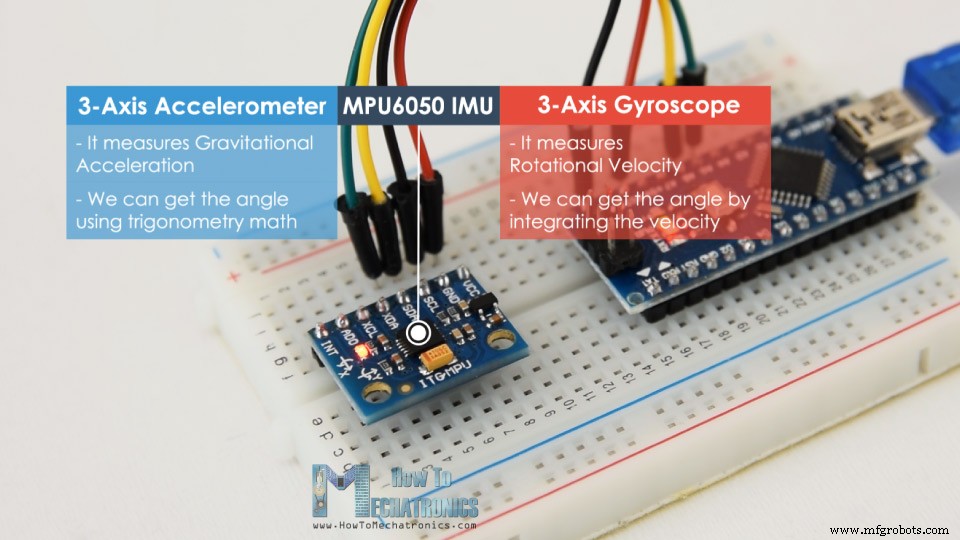
Sensorfusion (Komplementärfilter): Kurzfristig Gyro (präzise, kein Drift), langfristig Acc (korrigiert Drift). Typisch: 96% Gyro + 4% Acc. Yaw nur über Gyro (Magnetometer nötig für Driftkorrektur).
Arduino & MPU6050 – Verdrahtung & Code
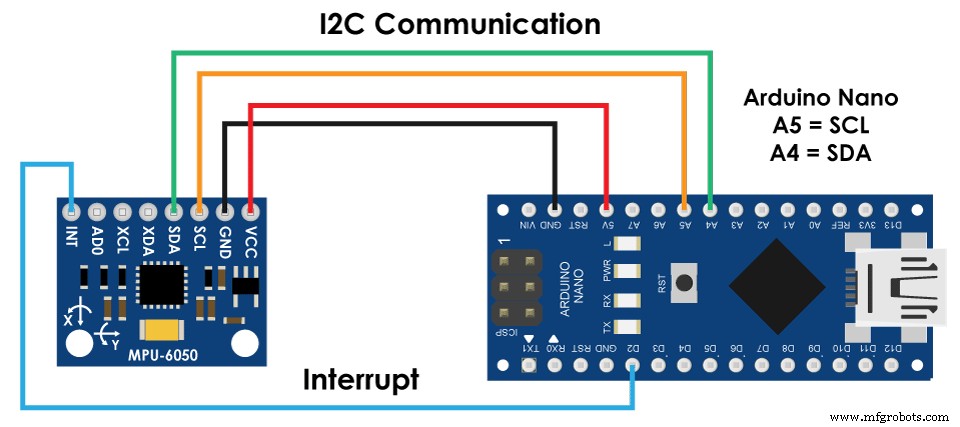
I²C-Kommunikation → nur 2 Leitungen (SDA, SCL) + VCC/GND.
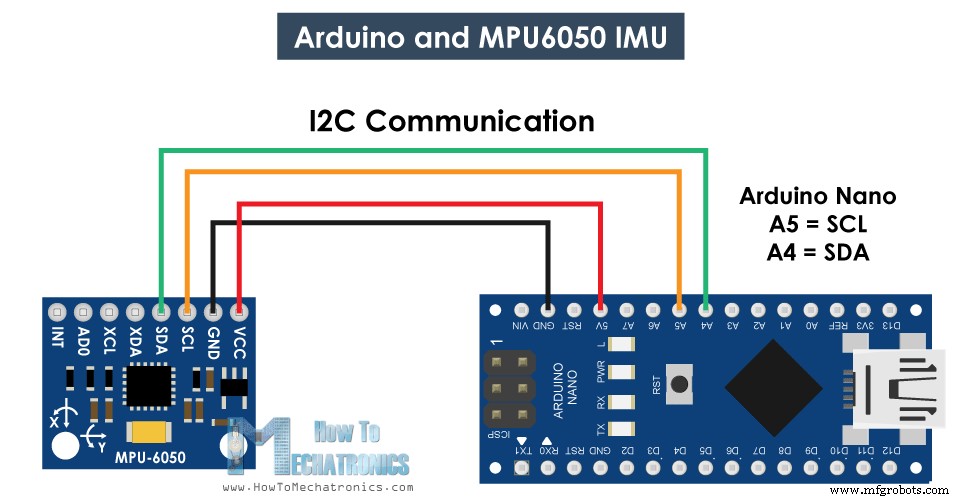
Benötigte Bauteile
- MPU6050 IMU Modul
- Arduino Board
- Steckbrett & Jumper-Kabel
Arduino Code – Rohdaten & Sensorfusion
/* Arduino & MPU6050 Tutorial
 * by Dejan, https://howtomechatronics.com
 */
#include <Wire.h>
const int MPU = 0x68; // I2C Adresse

float AccX, AccY, AccZ;
float GyroX, GyroY, GyroZ;
float accAngleX, accAngleY;
float gyroAngleX, gyroAngleY, gyroAngleZ;
float roll, pitch, yaw;
float AccErrorX, AccErrorY, GyroErrorX, GyroErrorY, GyroErrorZ;
float elapsedTime, currentTime, previousTime;
int c = 0;

void setup() {
  Serial.begin(19200);
  Wire.begin();
  // MPU6050 aus Sleep-Mode wecken (Register 0x6B = 0)
  Wire.beginTransmission(MPU);
  Wire.write(0x6B);
  Wire.write(0x00);
  Wire.endTransmission(true);

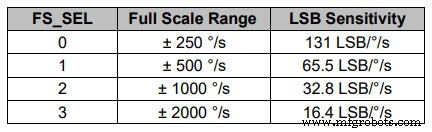
  // Optional: Messbereich einstellen (hier Default ±2g / ±250°/s)
  // Siehe Datasheet Register 0x1C (ACCEL_CONFIG) & 0x1B (GYRO_CONFIG)

  calculate_IMU_error(); // Kalibrierung
  delay(20);
}

void loop() {
  // === Beschleunigungsmesser lesen ===
  Wire.beginTransmission(MPU);
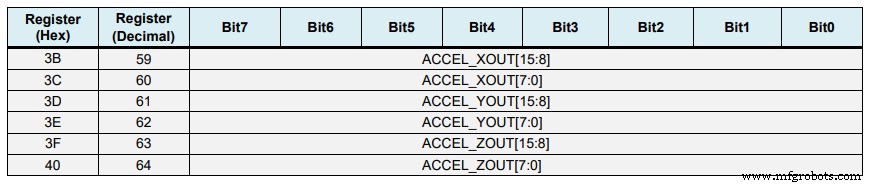
  Wire.write(0x3B); // ACCEL_XOUT_H
  Wire.endTransmission(false);
  Wire.requestFrom(MPU, 6, true); // 6 Register
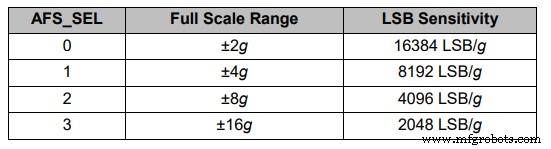
  AccX = (Wire.read() << 8 | Wire.read()) / 16384.0; // ±2g → 16384 LSB/g
  AccY = (Wire.read() << 8 | Wire.read()) / 16384.0;
  AccZ = (Wire.read() << 8 | Wire.read()) / 16384.0;

  // Roll & Pitch aus Acc-Daten
  accAngleX = (atan(AccY / sqrt(pow(AccX, 2) + pow(AccZ, 2))) * 180 / PI) - 0.58; // AccErrorX
  accAngleY = (atan(-1 * AccX / sqrt(pow(AccY, 2) + pow(AccZ, 2))) * 180 / PI) + 1.58; // AccErrorY

  // === Gyroskop lesen ===
  currentTime = millis();
  elapsedTime = (currentTime - previousTime) / 1000.0; // Sekunden
  previousTime = currentTime;

  Wire.beginTransmission(MPU);
  Wire.write(0x43); // GYRO_XOUT_H
  Wire.endTransmission(false);
  Wire.requestFrom(MPU, 6, true);
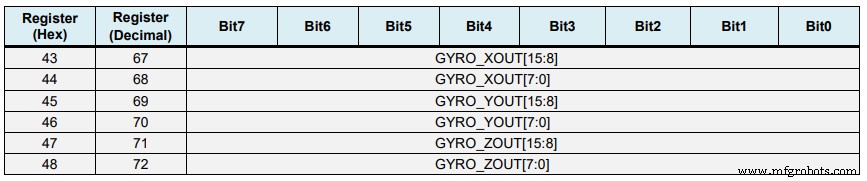
  GyroX = (Wire.read() << 8 | Wire.read()) / 131.0; // ±250°/s → 131 LSB/°/s
  GyroY = (Wire.read() << 8 | Wire.read()) / 131.0;
  GyroZ = (Wire.read() << 8 | Wire.read()) / 131.0;

  // Gyro-Fehler korrigieren (aus Kalibrierung)
  GyroX += 0.56;  // GyroErrorX
  GyroY -= 2.0;   // GyroErrorY
  GyroZ += 0.79;  // GyroErrorZ

  // Integration: °/s * s = °
  gyroAngleX += GyroX * elapsedTime;
  gyroAngleY += GyroY * elapsedTime;
  yaw        += GyroZ * elapsedTime;

  // Komplementärfilter (96% Gyro, 4% Acc)
  roll  = 0.96 * gyroAngleX + 0.04 * accAngleX;
  pitch = 0.96 * gyroAngleY + 0.04 * accAngleY;
  // Yaw: kein Acc-Referenz → Drift bleibt

  // Ausgabe
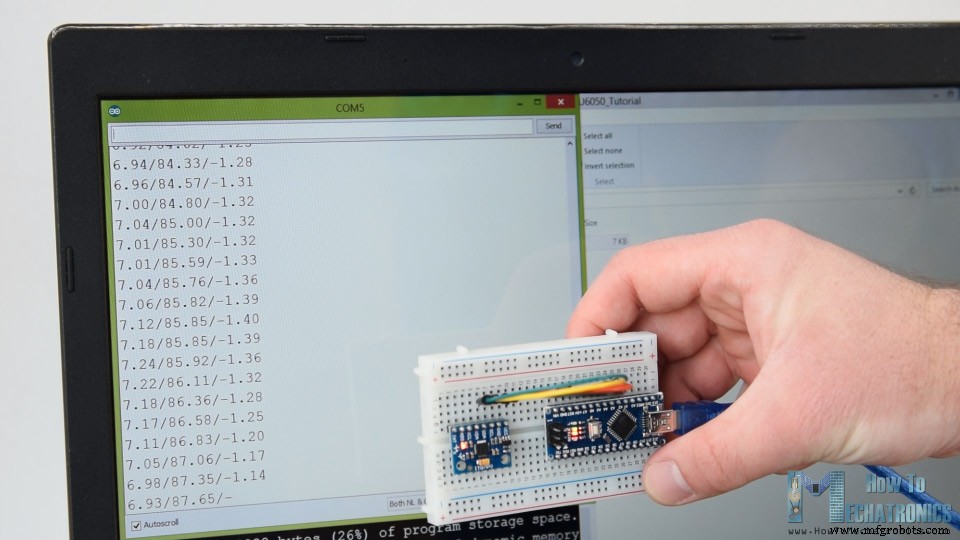
  Serial.print(roll);  Serial.print("/");
  Serial.print(pitch); Serial.print("/");
  Serial.println(yaw);
}

void calculate_IMU_error() {
  // 200 Messungen im ruhenden, flachen Zustand mitteln
  while (c < 200) {
    Wire.beginTransmission(MPU);
    Wire.write(0x3B);
    Wire.endTransmission(false);
    Wire.requestFrom(MPU, 6, true);
    AccX = (Wire.read() << 8 | Wire.read()) / 16384.0;
    AccY = (Wire.read() << 8 | Wire.read()) / 16384.0;
    AccZ = (Wire.read() << 8 | Wire.read()) / 16384.0;
    AccErrorX += atan(AccY / sqrt(pow(AccX, 2) + pow(AccZ, 2))) * 180 / PI;
    AccErrorY += atan(-1 * AccX / sqrt(pow(AccY, 2) + pow(AccZ, 2))) * 180 / PI;
    c++;
  }
  AccErrorX /= 200; AccErrorY /= 200; c = 0;

  while (c < 200) {
    Wire.beginTransmission(MPU);
    Wire.write(0x43);
    Wire.endTransmission(false);
    Wire.requestFrom(MPU, 6, true);
    GyroX = (Wire.read() << 8 | Wire.read()) / 131.0;
    GyroY = (Wire.read() << 8 | Wire.read()) / 131.0;
    GyroZ = (Wire.read() << 8 | Wire.read()) / 131.0;
    GyroErrorX += GyroX; GyroErrorY += GyroY; GyroErrorZ += GyroZ;
    c++;
  }
  GyroErrorX /= 200; GyroErrorY /= 200; GyroErrorZ /= 200;

  // Fehlerwerte auf Serial Monitor ausgeben → in Code oben eintragen
  Serial.print("AccErrorX: "); Serial.println(AccErrorX);
  Serial.print("AccErrorY: "); Serial.println(AccErrorY);
  Serial.print("GyroErrorX: "); Serial.println(GyroErrorX);
  Serial.print("GyroErrorY: "); Serial.println(GyroErrorY);
  Serial.print("GyroErrorZ: "); Serial.println(GyroErrorZ);
}
Code-Highlights
- I²C-Adresse 0x68 (Standard, AD0=GND)
- Register 0x6B (PWR_MGMT_1) = 0 → Wake up
- Empfindlichkeit: ±2g (16384 LSB/g), ±250°/s (131 LSB/°/s) – Default
calculate_IMU_error() im Setup aufrufen, Sensor flach hinlegen → Fehlerwerte notieren & im Code hartcodieren- Komplementärfilter:
roll = 0.96*gyro + 0.04*acc

MPU6050 Orientierungs-Tracking – 3D-Visualisierung (Processing)
Arduino sendet Roll/Pitch/Yaw via Serial. Processing empfängt & rotiert 3D-Objekt.
/* Arduino & MPU6050 - 3D Visualisierung
 * by Dejan, https://howtomechatronics.com
 */
import processing.serial.*;

Serial myPort;
String data = "";
float roll, pitch, yaw;

void setup() {
  size(2560, 1440, P3D);
  myPort = new Serial(this, "COM7", 19200); // Port & Baud anpassen!
  myPort.bufferUntil('\n');
}

void draw() {
  translate(width/2, height/2, 0);
  background(233);
  textSize(22);
  text("Roll: " + int(roll) + " Pitch: " + int(pitch), -100, 265);

  rotateX(radians(-pitch));
  rotateZ(radians(roll));
  rotateY(radians(yaw));

  textSize(30); fill(0, 76, 153);
  box(386, 40, 200); // 3D Box
  textSize(25); fill(255);
  text("www.HowToMechatronics.com", -183, 10, 101);
}

void serialEvent(Serial myPort) {
  data = myPort.readStringUntil('\n');
  if (data != null) {
    data = trim(data);
    String[] items = split(data, '/');
    if (items.length > 1) {
      roll  = float(items[0]);
      pitch = float(items[1]);
      yaw   = float(items[2]);
    }
  }
}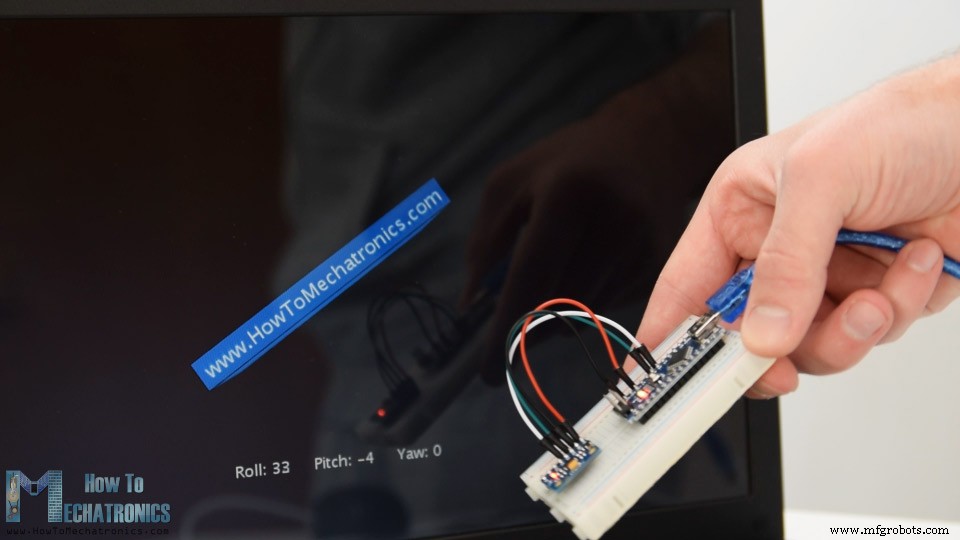
Funktioniert gut, aber Yaw driftet (kein Komplementärfilter möglich).
Digital Motion Processor (DMP) – Bessere Fusion & Quaternionen
MPU6050 hat onboard DMP: berechnet Quaternionen, eliminiert Yaw-Drift, vermeidet Gimbal-Lock.
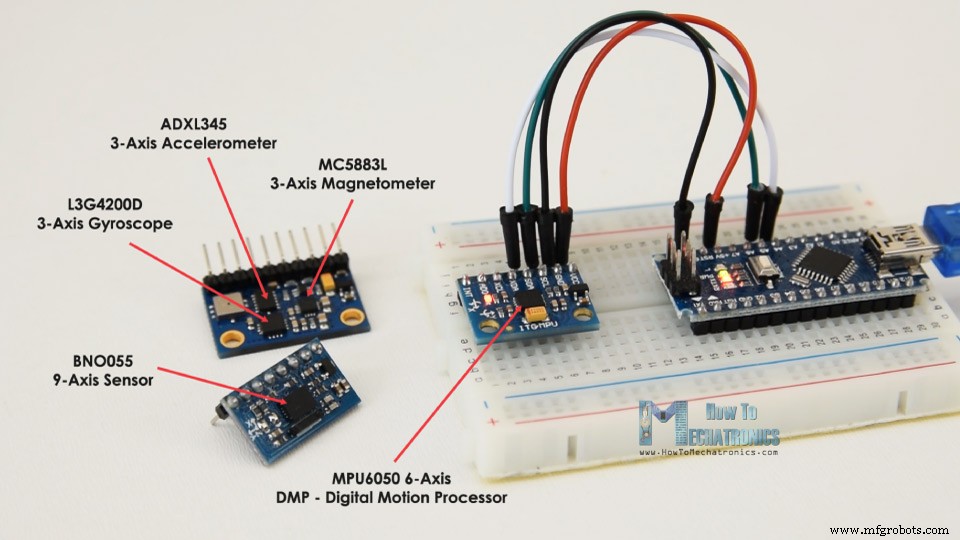
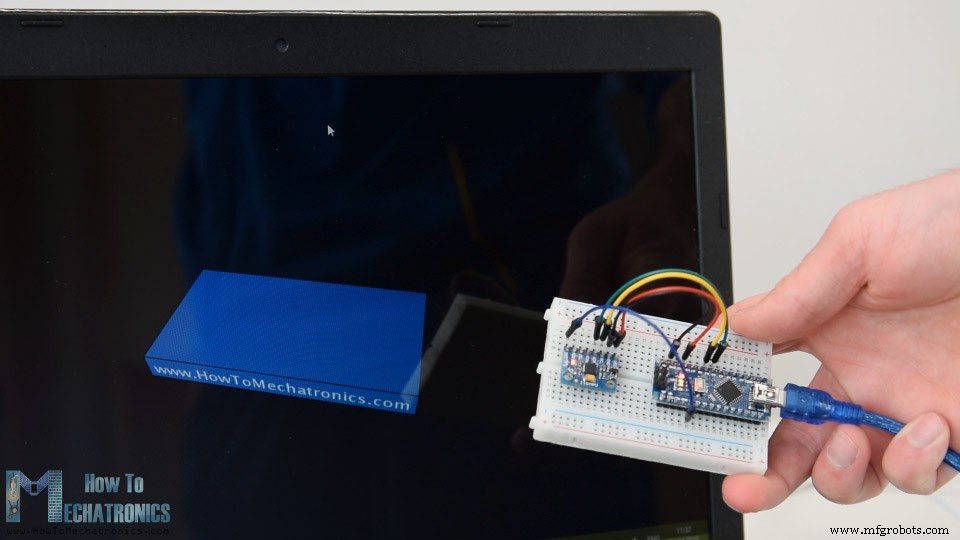
Voraussetzungen:
- Zusätzlicher Draht: INT-Pin (Interrupt) → Arduino Digitalpin (z. B. D2)
- Bibliothek: i2cdevlib (Jeff Rowberg)
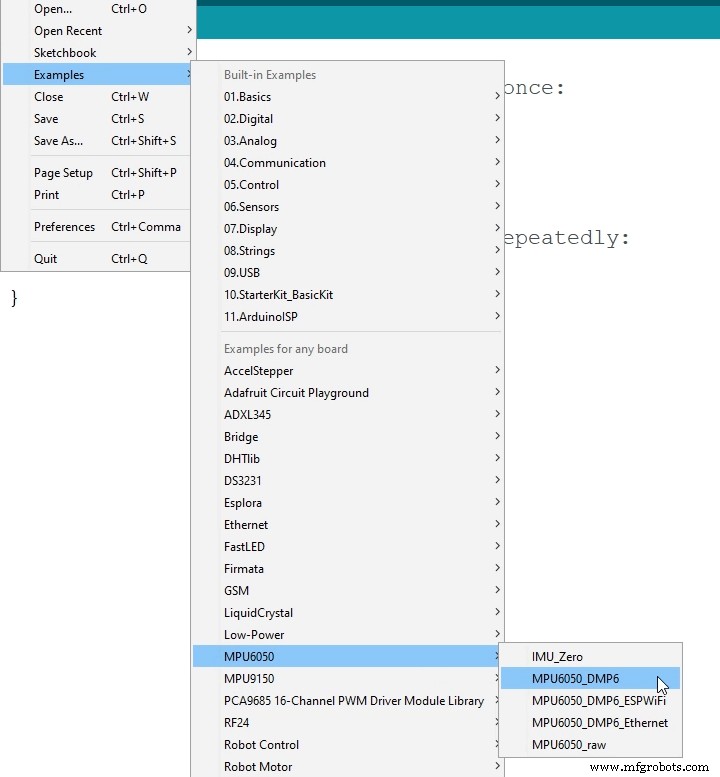
- Beispiel:
MPU6050_DMP6aus Library öffnen,#define OUTPUT_TEAPOTaktivieren
Processing-Code für TEAPOT-Output (Quaternionen):
/* MPU6050 DMP - 3D Visualisierung (Quaternionen)
 * by Dejan, https://howtomechatronics.com
 */
import processing.serial.*;

Serial myPort;
float[] q = new float[4]; // Quaternion
float roll, pitch, yaw;

void setup() {
  size(2560, 1440, P3D);
  myPort = new Serial(this, "COM7", 19200);
  myPort.bufferUntil('\n');
}

void draw() {
  translate(width/2, height/2, 0);
  background(233);
  textSize(22);
  text("Roll: " + int(roll) + " Pitch: " + int(pitch), -100, 265);

  // Quaternion → Euler für Anzeige (optional)
  // Rotation direkt via Quaternion in Processing 3D möglich
  rotateX(radians(-pitch));
  rotateZ(radians(roll));
  rotateY(radians(yaw));

  textSize(30); fill(0, 76, 153);
  box(386, 40, 200);
  textSize(25); fill(255);
  text("www.HowToMechatronics.com", -183, 10, 101);
}

void serialEvent(Serial myPort) {
  String data = myPort.readStringUntil('\n');
  if (data != null) {
    data = trim(data);
    // TEAPOT Format: $ q0 q1 q2 q3 ...
    String[] parts = split(data, ' ');
    if (parts.length >= 4) {
      q[0] = float(parts[1]);
      q[1] = float(parts[2]);
      q[2] = float(parts[3]);
      q[3] = float(parts[4].substring(0, parts[4].length()-1)); // * entfernen
      // Quaternion zu Euler (vereinfacht)
      // Siehe DMP6 Beispiel für genaue Umrechnung
    }
  }
}
Das zweite Beispiel (DIY Gimbal / Selbststabilisierende Plattform) ist in einem separaten Artikel beschrieben.
Fragen in den Kommentaren. Meine Arduino-Projektsammlung anschauen.
Herstellungsprozess
- Sicheres Arduino RFID-Schloss bauen – Schritt-für-Schritt-Anleitung
- LCD-Animationen & Spiele mit Arduino UNO erstellen
- Arduino & MPU6050: Präzise Servomotor-Steuerung mit SG90 & MG996R
- Python 3 zu Arduino UNO: Einfache Steuerung & LED-Demo
- Kompaktes FM-Radio mit Arduino Nano und RDA5807M selbst bauen
- Neigungswinkel aus MPU6050-Beschleunigung mit Arduino Nano & Visuino berechnen
- Arduino Nano Fingerabdruck-Sensor-Projekt – Schritt-für-Schritt-Tutorial
- Mini-Klavier mit Arduino UNO bauen – Schritt-für-Schritt-Anleitung
- Raspberry Pi 3 & Arduino Laptop selbst bauen: Schritt-für-Schritt-Anleitung
- Arduino Einsteiger Tutorial #1: Erstes Projekt (Blink)