



Arduino & Processing Serial Kommunikation – Tutorial #6
Verbinden von Arduino mit Processing IDE über Serial Port. Bidirektionale Kommunikation: Processing sendet Befehle an Arduino (LED an/aus), Arduino sendet Taster-Status an Processing. Linke Maustaste → LED an, Rechte Maustaste → LED aus. Taster-Druck → Text in Processing-Fenster.Arduino Tutorial #6: Processing Serial Kommunikation
Komponenten
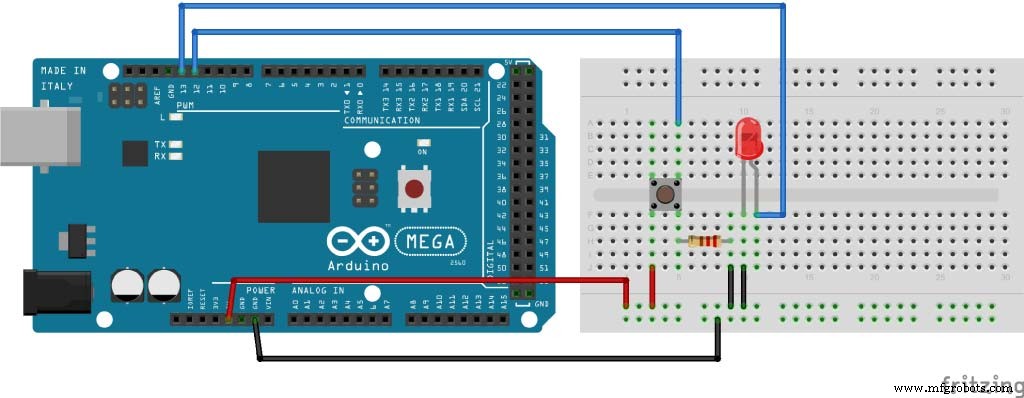
Schaltplan
Arduino Code
int led = 13;
int button = 12;

void setup() {
  pinMode(led, OUTPUT);
  pinMode(button, INPUT);
  Serial.begin(9600);
}

void loop() {
  if (Serial.available() > 0) {
    char ledState = Serial.read();
    if (ledState == '1') digitalWrite(led, HIGH);
    if (ledState == '0') digitalWrite(led, LOW);
  }
  int buttonState = digitalRead(button);
  if (buttonState == HIGH) {
    Serial.println("Button is pressed");
    delay(500);
  }
}
Processing Code
import processing.serial.*;

Serial myPort;
String myText = "";

void setup() {
  size(300, 300);
  myPort = new Serial(this, "COM4", 9600);
  myPort.bufferUntil('\n');
}

void serialEvent(Serial myPort) {
  myText = myPort.readStringUntil('\n');
}

void draw() {
  background(0);
  text(myText, 120, 120);
  myText = "";
  if (mousePressed && (mouseButton == LEFT)) {
    myPort.write('1');
  }
  if (mousePressed && (mouseButton == RIGHT)) {
    myPort.write('0');
  }
}
Herstellungsprozess
- Sicheres Arduino RFID-Schloss bauen – Schritt-für-Schritt-Anleitung
- Intelligenter Parkplatzzähler: Echtzeit-Fahrzeugverfolgung mit Arduino, Processing & PHP
- Arduino Nano Fingerabdruck-Sensor-Projekt – Schritt-für-Schritt-Tutorial
- Mini-Klavier mit Arduino UNO bauen – Schritt-für-Schritt-Anleitung
- JARVIS v1 Heimautomation mit Arduino Nano – Schritt-für-Schritt Tutorial
- Arduino Multithreading mit Protothreading meistern: Ein Schritt-für-Schritt-Tutorial
- Komplettes Arduino 16×2 LCD Tutorial: Anschließen, Programmieren & Daten anzeigen
- MPU6050 Beschleunigungs- & Gyrosensor mit Arduino: Tutorial
- Bürstenloser Motor (BLDC) mit Arduino & ESC steuern: Schritt-für-Schritt
- Arduino Einsteiger Tutorial #1: Erstes Projekt (Blink)